Vermillion Insights
March 7, 2026 · Ken Vermeille · 18 min read
Artificial Intelligence App Development From Idea to Launch
A practical guide to artificial intelligence app development. Learn to build, launch, and scale high-impact AI features in your React Native subscription app.

Let’s be honest. For most subscription apps, "adding AI" sounds like a recipe for a six-month-long science project that goes nowhere. It feels like a distraction, something only VC-backed giants with huge engineering teams can afford to chase.
But that’s a dangerously outdated way of thinking. For small teams, integrating AI isn't about building Skynet. It’s about shipping smart, high-impact features that make your app stickier and get more users to pull out their credit cards.
Beyond the Hype: How AI Is Reshaping Subscription Apps

If your app is in that $10K–$500K MRR range, your biggest bottleneck is almost always engineering speed. Your growth and marketing ideas probably move way faster than your team’s ability to build and test them.
This is where AI stops being a buzzword and becomes a secret weapon. It allows a lean team to punch way above its weight class, delivering features that used to require a whole squad of specialists.
The trick is to forget about building massive, complex models from scratch. Instead, focus on small, surgical strikes that use pre-trained models and APIs. A single developer can ship a genuinely useful AI feature in a week, not a quarter.
Practical AI Use Cases for Subscription Apps
The best AI features don't scream "AI." They just make your app feel smarter and more indispensable. They solve a real user problem in a way that feels almost like magic, but they’re built on practical, achievable engineering.
Here are a few ideas you could start building next week:
- Dynamic Paywalls: Your static paywall is leaving money on the table. An AI model can look at a user's behavior - which features they touch, how long their sessions are, what they ignore - and show them the perfect upgrade prompt. Actionable Insight: For a fitness app, a user who only logs running workouts might see a paywall that specifically highlights a new AI-powered "Adaptive Running Plan." This is far more likely to convert than a generic "Go Pro" screen.
- Personalized Onboarding: The first five minutes in your app are critical. Instead of a one-size-fits-all tour, use AI to build a custom onboarding flow on the fly. Practical Example: A language-learning app could use a quick placement quiz to generate a unique first-week curriculum. This instantly shows the user you understand them, which is a massive boost for activation and retention.
- Endless Content Generation: Running a meditation app? Instead of a limited library of scripts, let AI generate a new guided meditation based on the user's current mood. Practical Example: Someone feeling "anxious" gets a calming script, while someone who's "unfocused" gets a session designed for clarity. You get an infinite stream of fresh, personalized content with zero manual work.
The goal isn't to build a "sentient" app. It's to use AI to make your app smarter, more personal, and ultimately more valuable to your subscribers. This pragmatic approach turns engineering from a bottleneck into a growth driver.
Finding Your First High-Impact AI Feature
The world of AI features is littered with ambitious "moonshot" ideas. I’ve seen founders burn through cash and time chasing a vision that’s years away from reality. While it’s tempting to imagine a fully autonomous app, that’s not where you start.
The smarter approach? Find a quick win. We're looking for the small, strategic feature that solves a real, nagging problem for your users. This is what delights them, keeps them around, and gives you a rock-solid reason to gate it behind your premium subscription.
Uncover Opportunities in Your User Data
Your best ideas won't come from a brainstorming session about "what AI can do." They're already hiding in your user data, just waiting for you to find them. The tools you already use for subscription analytics, like Adapty or RevenueCat, are goldmines. They show you exactly what your most loyal users do and where others give up.
Start digging into your analytics with these questions:
- Where do users spend the most manual effort? Practical Example: If you have a journaling app and people spend ages tagging entries, an AI-powered smart-tagging feature is a massive win.
- What repetitive task is causing friction? Practical Example: For a wellness app where users manually log meals, an AI that identifies food from a photo isn't just cool - it removes a huge barrier to daily use.
- What actions correlate with upgrades? Practical Example: If users who create custom workout plans are your most likely subscribers, what about an AI that generates a truly personalized plan based on their goals, available equipment, and feedback? That's a powerful upsell.
Look for the things that make users sigh. The high-effort tasks, the points of friction, the repetitive chores. These are the perfect places to inject a little AI magic and make your app feel indispensable.
The goal is to find a user problem that is both painful and frequent. Solving that with AI creates a feature users won't just like - they'll feel they can't live without it.
Define Your Minimum Viable AI Feature
Once you've got a promising idea, the next step is critical: scope it down to the absolute smallest version that can still provide value. This is your Minimum Viable Product (MVP). Too many teams try to build the entire AI dream in one go. Don't. Your only goal with the first version is to prove your core idea works.
When you're trying to identify your first high-impact AI feature, consulting a comprehensive guide to AI for product development in SaaS can provide a structured framework for this process.
Here’s a no-nonsense checklist I use to define an AI MVP:
- Core Problem: What single, specific user pain point does this solve? Actionable Insight: Instead of "AI workout coach," be brutally specific: "Suggest an alternative exercise when the user doesn't have the right equipment."
- Success Metric: How will you know it's working? Practical Example: "A 10% lift in upgrades from users who engage with the 'AI Summary' feature" is clear and measurable. "Users like it" is not.
- User Input: What's the simplest thing the user has to give you? A block of text? A single photo? A mood selection? Keep it simple.
- AI Output: What's the simplest valuable thing the AI can return? A three-bullet summary. A list of five ingredients. A single recommended meditation.
- Failure State: What happens if the AI messes up or provides a garbage result? Have a graceful fallback. A simple "Try again" button or a polite error message is often enough for V1.
This discipline prevents scope creep. For a fitness app, the AI MVP isn't a complex coach that manages every detail of a user's life. It's a simple button that suggests three alternative exercises when a user marks one as "too difficult." Small, achievable, and incredibly easy to test.
On-Device vs. Cloud Models
One of the first big technical decisions you'll face is where the "brains" of your AI feature will live: on the user's device or in the cloud. This choice has major implications for your app's speed, cost, user privacy, and overall complexity. There’s no single right answer - it all depends on the job you need the AI to do.
To make it clearer, here’s a breakdown of the trade-offs we consider when advising clients.
On-Device vs Cloud AI Models for Subscription Apps
A practical comparison to help you choose the right AI model architecture based on your app's needs for speed, cost, privacy, and complexity.
| Factor | On-Device AI (e.g., Core ML, TensorFlow Lite) | Cloud-Based AI (e.g., OpenAI API, Claude API) |
|---|---|---|
| Speed & Latency | Instantaneous. Processing happens locally, so there's no network lag. Ideal for real-time features. | Slower. Depends on network conditions and API server load. Can introduce noticeable delays. |
| Cost | Zero per-use cost. You have a one-time development cost, but no ongoing API bills that scale with users. | Pay-as-you-go. Costs scale directly with user engagement. Can get very expensive for popular features. |
| User Privacy | Excellent. User data never leaves their device, which is a huge selling point for privacy-conscious users. | A potential concern. Data is sent to a third-party server for processing, requiring clear privacy policies. |
| Offline Functionality | Works perfectly. The feature is available even without an internet connection. | Requires internet. The feature will not work offline, which can be a dealbreaker for some apps. |
| Model Power & Complexity | Limited. Constrained by the device's processing power and memory. Best for smaller, specialized tasks. | Virtually unlimited. Access to massive, state-of-the-art models (like GPT-4) for complex reasoning and generation. |
| Updates & Maintenance | Difficult. Updating the model requires shipping a full app update through the App Store or Google Play. | Easy. You can swap or update the backend model anytime without changing the app itself. |
For most subscription apps, starting with a cloud-based API from a provider like OpenAI or Anthropic is the most practical path. It lets you validate your feature idea quickly and affordably.
If the feature proves to be a core driver of your business, you can always invest in building a custom on-device model later. This is exactly how you can leverage **artificial intelligence personalization** to create sticky features that drive upgrades and long-term retention.
Choosing Your AI Model and Data Strategy
Alright, you’ve pinpointed the AI feature you believe will make a real difference. Now for the hard part: making the technical choices that will actually bring it to life.
This is where a lot of projects go off the rails. The decisions you make now will ripple through your app’s performance, your budget, and ultimately, whether users love or hate the feature. It’s a classic balancing act between speed, raw power, and what’s practical for your team to build and maintain.
The first big question you have to answer is where the AI brain will live. Will it run on the user's phone, or will it be in the cloud? Each path has serious trade-offs.
On-Device vs. Cloud AI Models
On-device models are just what they sound like - they run directly on the user's phone using frameworks like TensorFlow Lite or Core ML. The upside here is huge: they're blazing fast, they work offline, and they're completely private since user data never leaves the device.
The catch? You’re limited by the hardware in someone's pocket. This makes on-device AI perfect for smaller, focused tasks - think real-time object detection in a photo or basic text classification - but not for heavy-duty thinking.
Cloud-based models are the big guns. We're talking about models accessed through an API from providers like OpenAI (GPT-4) or Anthropic (Claude). These Large Language Models (LLMs) have staggering power and can handle complex reasoning, generate creative text, and perform deep analysis.
But that power comes at a price. They need an internet connection, which introduces a slight delay (latency), and you’re on a pay-as-you-go plan. If your feature takes off, that bill can get surprisingly high, fast. You also have to be crystal clear with your users that their data is being sent to a third-party service for processing.
This flowchart is a good starting point for that initial gut check - should you build it yourself or just plug into a powerful API?
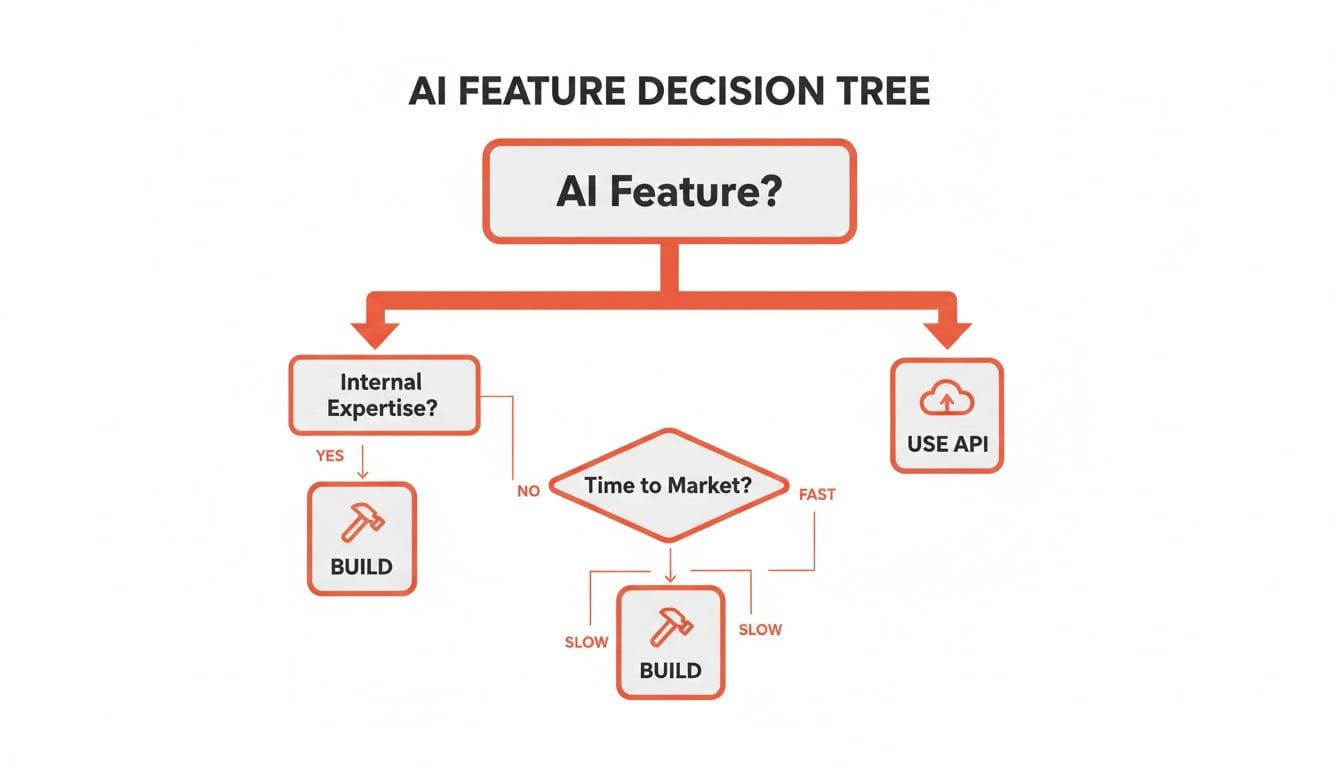
For most subscription apps, especially when you're just testing the waters with a new feature, grabbing a cloud-based API is almost always the right move. It cuts down on the upfront engineering and gets your idea in front of paying customers as quickly as possible.
Building Your Data Pipeline and Embeddings
No matter which model you pick, AI is hungry for data. This is where your data pipeline comes in. It’s the plumbing that takes all the messy, raw user data from your React Native app and turns it into something the AI can actually understand.
For many apps, this means taking user-generated content - journal entries, workout logs, project notes - and converting it into embeddings.
Think of embeddings as a universal translator for data. They turn complex stuff like text and images into a simple list of numbers (a vector) that captures the semantic meaning.
Embeddings are what allow an AI to understand that the words "sad" and "unhappy" are conceptually close, while "happy" is far away, just by looking at the numbers.
This is the secret sauce behind a lot of "magical" AI features:
- Semantic Search: Lets users search for ideas, not just keywords. Practical Example: Someone could search for "that idea I had about a marketing plan," and the app could find the note even if those exact words aren't in it.
- Personalized Recommendations: By comparing the embeddings of things a user already loves, you can surface other content that is a near-perfect match. Practical Example: A meditation app can recommend a "breathing exercise for focus" after a user completes a "guided session on clarity."
- Clustering: Automatically group similar items. Practical Example: Imagine an app that organizes a user's photos or notes into neat, logical categories without any manual tagging.
Building this pipeline means handling user data with extreme care. Getting it wrong is a classic mistake. It's one of the most common AI build money pits that can completely derail a project and lead to expensive, soul-crushing rework.
The industry is moving fast. Today, 84% of developers are already using or planning to use AI tools, a big jump from just 76% in 2024. While OpenAI's GPT models are the go-to for 81.4% of devs, a solid 42.8% are also bringing Claude Sonnet into their stacks.
But here’s the reality check: with only 32.7% of developers fully trusting AI outputs, human oversight is still non-negotiable. Many are finding they spend more time than expected just debugging AI-generated code.
If you go the cloud route, you’ll likely want to adapt the model to your specific domain. A good guide on how to fine-tune LLMs can give you the practical steps to make a general model perform like a specialist for your app's unique needs.
Connecting AI Features to Your Revenue Stream

You’ve wrestled with the models, built the data pipeline, and shipped a brilliant AI feature. That’s a massive engineering achievement. But an amazing feature that doesn’t move your Monthly Recurring Revenue (MRR) is just an expensive hobby.
Now for the real work: connecting that effort directly to your bank account. This isn't about slapping a price tag on it. It’s about strategically presenting and gating your AI so that upgrading feels less like a choice and more like a necessity.
How to Gate Your AI Features Without Killing Engagement
The biggest mistake I see is giving too much away for free. A free taste is a great hook, but you need a firm line that nudges users who see the value toward a paid plan. Your subscription management tool, like RevenueCat or Adapty, is your best friend here.
The goal is to define rules that let casual users see the magic but require power users to pay for it. Here are a couple of battle-tested gating strategies that just work:
- Usage-Based Limits: Give users a set number of free AI actions per day or month. Practical Example: A productivity app with an AI summarizer might offer three free summaries a day. After the third one, a paywall pops up. This model is perfect because it lets the user experience the "aha!" moment and creates a real need they're willing to pay to solve.
- Freemium with a "Pro" Tier: Offer the basic AI feature for free but keep the truly powerful stuff for subscribers. Practical Example: A photo editing app could offer a "one-click AI enhance" for everyone. But the game-changing features, like "AI object removal" or "AI background replacement," are locked behind the pro subscription.
This naturally segments your user base. Everyone gets value from your artificial intelligence app development, but your most engaged users have a clear, compelling reason to upgrade.
Your Paywall Is Your Final Sales Pitch
A generic "Go Pro" button is a waste of a perfect opportunity. When a user hits a usage limit trying to use an AI feature, the paywall they see needs to be contextual. It has to speak directly to the problem they were just trying to solve.
Your paywall isn't a gate; it's a sales pitch. It must close the deal by showing the user the "before and after" transformation your premium AI feature offers.
Forget the generic price list. You need to design a paywall that sells the outcome. Tools like Superwall are built for this, letting you create and A/B test these dynamic, context-aware paywalls.
Weak Paywall:
- Title: Upgrade to Pro
- Benefits: Unlimited Access, Advanced Features, Remove Ads
- Price: $9.99/month
Strong, Contextual Paywall (for a summarizer app):
- Title: Never Write a Boring Summary Again
- Benefits:
- Unlock unlimited AI-powered summaries to save hours each week.
- Get deeper insights with advanced analysis on every note.
- Access our full suite of AI writing tools.
- Price: $9.99/month
The second one works because it connects the feature to a real-world benefit - saving time and getting smarter. Actionable Insight: You should be A/B testing your value props. Does "time saved" convert better than "deeper insights"? The data will tell you.
This laser focus on benefit-driven communication is a core principle of the **best app monetization strategies**. It’s how you make sure all that complex engineering work actually grows your revenue.
Alright, let's get this done. Shipping your AI feature isn't popping the champagne; it's lacing up for the marathon. The build was the easy part. Now, the real work begins: learning from your users and turning a novel feature into something they can't live without.
This means creating a tight feedback loop. You ship, you measure, you learn, and you improve. Fast.
The speed of this loop is your only real competitive advantage. The market is moving at a breakneck pace. ChatGPT went from 100 million weekly active users in late 2023 and is on track for 800 million by October 2025. With 88% of companies already using AI and the market projected to hit $2 trillion by 2026, you can't afford to be slow. You can dig into more of these AI market trends in a recent report from Vention.
What to Watch: The KPIs That Actually Matter
You can't fix what you can't see. Generic app analytics are useless here. You need to track metrics that tell you the real story of your AI feature's performance. A dedicated dashboard isn't a nice-to-have; it's a necessity.
I group these KPIs into three buckets:
- Model Performance: Is the AI actually doing its job well?
- Latency: How long does a user wait for a result? Actionable Insight: For any feature trying to feel real-time, more than two seconds feels broken. Track this P95 (95th percentile) to see what your slowest users experience.
- Error Rate: How often does the model just... fail? If this number is high, you have a technical fire to put out.
- "Helpfulness" Score: This is pure gold. After the AI does its thing, ask the user: "Was this helpful?" A simple thumbs-up/down is all you need.
- The Financial Bleed: AI costs money, especially cloud APIs. You have to watch this like a hawk.
- Cost Per User: What’s the average API cost for someone who actually uses the feature? Actionable Insight: If your cost per user is approaching your ARPU, your model is not financially viable.
- Total API Spend: Track this daily and monthly. Set up billing alerts so you don’t get a five-figure surprise at the end of the month.
- Revenue Per Feature User: Are the people using your AI feature more likely to become - or stay - subscribers? Connect the dots.
- User Engagement: Do people even care about what you built?
- Adoption Rate: What percentage of your active users have even tried the feature once?
- Frequency of Use: How often do they come back? Is this a daily tool or a one-and-done gimmick?
- Correlation with Retention: Look at user cohorts. Do the ones who use the AI stick around longer? A higher 30-day retention here is a huge win.
Getting Feedback That Doesn't Suck
Analytics tell you what users are doing. You need to talk to them to find out why. For AI features, you need to be specific. Generic surveys are a waste of everyone's time.
The trick is to use automated, in-app micro-surveys that trigger right after an AI interaction. Don't ask, "Did you like the feature?" Ask something pointed.
Practical Example: a fitness app with AI meal planning:
A user just generated a meal plan. A few hours later, send a push notification or an in-app prompt.
- "How well did today's AI-suggested lunch fit your diet?" (Scale of 1-5)
- "Was there anything you wish the AI had considered?" (Open text)
This kind of targeted feedback is infinitely more valuable than a random App Store review.
The most valuable feedback comes from observing the gap between what a user expected the AI to do and what it actually did. Your goal is to find and close that gap.
The Never-Ending Cycle of Improvement
Your KPIs and user feedback are the fuel for your iteration engine. This isn't a quarterly review; it should be a constant, weekly process. Look at your dashboard. Did that spike in API costs line up with your last marketing push? Did the "helpfulness" score drop right after you tweaked the model's prompts?
This is also your first line of defense for responsible AI. If you see the model giving weird or biased answers for a specific group of users, that's a five-alarm fire. You have to address it immediately.
Trust is everything. Be transparent about what your AI does and what data it's using. A clear privacy policy isn't just legal CYA; it's a critical part of the user experience.
By marrying the hard data with real user stories, you build a powerful, continuous loop. Watch the numbers, talk to your users, and iterate relentlessly. That's how you build an AI feature that drives real growth for your app.
Common Questions on AI App Development
When founders start talking about adding AI to their subscription app, the same three questions always come up. It boils down to cost, team, and risk. Let's cut through the hype and get into the real-world answers we give our clients every day.
How Much Does It Cost to Add an AI Feature?
There’s no single price tag. Integrating AI is a spectrum, and where you land depends entirely on what you’re trying to build.
Practical Example (Quick Win): Hooking into a third-party API like OpenAI to power a simple text summarizer is a well-defined task. For an experienced React Native developer, you’re probably looking at 40-80 hours to build the UI, manage the API calls, and handle all the loading states. Your ongoing cost here is pay-as-you-go, so it grows with user engagement.
Practical Example (Heavy Lift): Building a custom, on-device model for a unique purpose, like identifying specific types of plants from a photo. This isn’t a few weeks of work; it can easily run into hundreds of hours and requires specialized data science talent to gather data, train the model, and shrink it down for mobile.
Our advice is almost always the same: start small. Prove the concept first. Build a feature-scoped MVP using an existing API to see if it actually moves the needle on your business goals. You can always pour money into a custom model later, once you know it's a worthwhile investment.
This approach keeps your upfront costs in check and stops you from burning cash on a feature nobody wants.
Can I Build an AI App Without a Data Scientist?
Yes. In fact, for most subscription apps, you absolutely should. You don't need a PhD on your payroll to ship a compelling AI feature.
The entire game has shifted. Today, it’s about standing on the shoulders of giants. Companies like OpenAI, Anthropic (Claude), and Google (Gemini) have already done the incredibly expensive work of training massive, powerful models. Your engineer's job isn't to build an AI brain from scratch; it's to find clever ways to use the ones that already exist.
This opens up a ton of possibilities without needing a data science team. Here are some practical examples a single developer can build:
- Smarter Content: A fitness app could generate personalized workout plans by sending a prompt like: "Create a 3-day home workout plan for a beginner focused on weight loss with no equipment."
- Intuitive Search: A journaling app could let users search for concepts and feelings instead of just exact keywords.
- Helpful Suggestions: A community app could suggest smart replies to help users engage in conversations more easily.
The real win comes from smart integration and a killer user experience, not from building the underlying tech yourself.
What Are the Biggest Risks of AI Implementation?
The potential is huge, but so are the pitfalls. Ignoring them is a surefire way to end up with runaway costs, angry users, and even legal headaches. From what we've seen, the risks fall into three main buckets.
- Your API Bill Spirals Out of Control: Pay-as-you-go pricing is great until your feature goes viral. A sudden spike in usage can lead to a shocking API bill you didn't budget for.
- Actionable Insight: Set hard budget alerts in your cloud provider’s dashboard from day one. And track your cost-per-user obsessively, just like any other core metric.
- The User Experience Sucks: Nothing kills a feature faster than a slow or dumb AI. If a user has to wait five seconds for a mediocre response, they're not going to try again. They'll just close the app.
- Actionable Insight: Design for latency. Assume the API call will be slow. Use loading skeletons, stream responses token-by-token, and always have a fallback for when the AI fails or gives a garbage answer (e.g., a button that says "Refine your request").
- You Create a Data Privacy Nightmare: Sending user data to a third-party AI is a massive liability. If you aren't transparent about what data you're sending and why, you're breaking user trust and wading into a legal minefield.
- Actionable Insight: Anonymize everything. Never, ever send personally identifiable information (PII) to an external API. Your privacy policy needs to be crystal clear and easy for a normal human to understand. This is non-negotiable.
At Vermillion, we live and breathe this stuff every day. We act as an embedded React Native engineering partner for subscription app teams, shipping production features weekly. If you're bottlenecked by engineering and need to move faster on AI initiatives, paywall experiments, or onboarding flows, let's talk. We integrate directly into your team, your Slack, and your sprints from day one.
Learn more at https://vermillion.agency.
Keep reading
See all →
March 22, 2026
Unlocking Revenue Your Guide to Price Tier Strategy

March 21, 2026
Your Guide to Flawless Stripe Subscription Management

May 14, 2026
Fractional Mobile Engineering vs. Full-Time Hiring in 2026
The mobile engineering talent market has shifted dramatically over the past two years. Budgets are tighter, AI tools have changed what a sin...
March 20, 2026
Recurring Billing With Stripe a Guide for Subscription Apps
Master recurring billing with Stripe. This guide covers everything from setup and server logic to webhooks and churn reduction for subscript...

March 19, 2026
Unlocking Growth with Mobile App Retention Metrics
Discover the mobile app retention metrics that directly fuel MRR growth. This founder's guide offers actionable strategies to track, analyze...