What Is In App Purchase A Founder's Guide To Mobile Revenue
An in-app purchase (IAP) is exactly what it sounds like: a transaction for a digital good or service that happens directly inside a mobile app.
Think of it this way: downloading the app is like getting a free ticket to a theme park. The in-app purchase is when you decide to buy snacks, fast passes, or souvenirs once you're inside. For example, the popular language-learning app Duolingo is free to use, but you can purchase "Gems" (an in-app purchase) to refill your "Hearts" and continue lessons without waiting.
Your Quick Guide To In-App Purchases
This model powers many of the most successful apps on the market today. Instead of asking users to pay upfront, developers offer value through optional purchases made after the initial download. It’s a brilliant strategy because it lowers the barrier to entry, letting you attract a massive user base that you can then monetize over time.
And it’s not a small niche; it's a dominant force in the mobile economy. The in-app purchase market, valued at $257.23 billion in 2025, is on track to hit an incredible $657.18 billion by 2029. That explosive growth is all thanks to the rise of subscriptions and the expansion of mobile into new markets.
The Core IAP Concepts
At its heart, an in-app purchase is just a way to unlock new functionality, content, or services for a user. Getting the basic types down is the first step toward building a monetization plan that actually works. All these transactions are handled directly through the user's Apple App Store or Google Play account, which provides a secure and familiar payment experience they already trust.
There are three main flavors of IAPs, and they form the foundation of nearly every mobile revenue model you see in the wild.
To make this easier to digest, here's a quick breakdown of the different IAP types and where you typically see them.
Quick Overview Of In-App Purchase Types
| IAP Type | What It Is | Common Examples |
|---|---|---|
| **Consumables** | Items that are used once and can be bought again. | Extra lives in a game like *Candy Crush*, digital currency in *Roblox*, one-time hints or boosts in a puzzle app. |
| **Non-Consumables** | One-time purchases that permanently unlock a feature. | Removing ads forever in a utility app, unlocking a "Pro" version of a photo editor, buying a premium brush pack in *Procreate*. |
| **Subscriptions** | Recurring payments for ongoing access to content or services. | Monthly access to a meditation library in *Calm*, yearly plan for cloud storage on *Dropbox*, access to exclusive content on *Spotify Premium*. |
Each model serves a different purpose, and the best one for your app depends entirely on the kind of value you're offering.
Key Takeaway: The IAP model lets you align your revenue directly with the value you provide. By offering a free core experience, you can prove your app's worth before asking users to open their wallets, which can massively increase your conversion rates.
Ultimately, picking the right IAP type comes down to your app's function and how people actually engage with it. For a much deeper dive into building a solid revenue stream, check out our complete guide on how to monetize a mobile app. Nailing this foundation is essential for everything that comes next.
The Four Core In-App Purchase Models
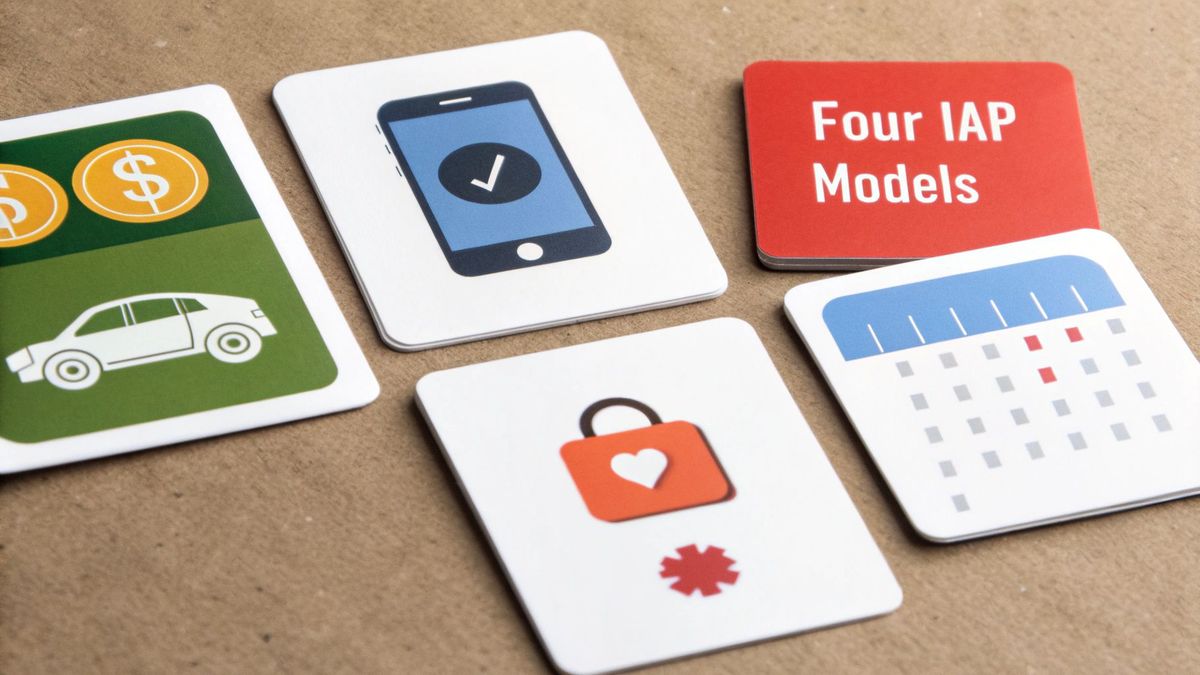
Picking the right in-app purchase model is like choosing an engine for a car—it has to match what the vehicle is built for. Your monetization strategy needs to line up perfectly with how your users get value from the app. Get it right, and you create a smooth, intuitive experience. Get it wrong, and it feels like you're trying to put a V8 in a Prius.
Each model pushes different user behaviors and directly shapes critical growth metrics like customer lifetime value (LTV). Let's break down the four main types you’ll run into, with real-world examples you can steal for your own product.
Consumable Purchases
Consumables are digital items users buy, use up, and then—if they want more—buy again. Think of them as the digital version of tokens at an arcade. You buy a handful, play some games, and when you run out, you head back to the counter.
This model is a workhorse for games and social apps where repeat engagement is key. A classic what is in app purchase example is the 'Super Like' on Tinder. You get a few for free, but you can buy more to really stand out. In the B2B world, a productivity app might sell "credits" that users burn to perform a premium action, like using an AI feature to summarize a long document.
Non-Consumable Purchases
On the flip side, non-consumables are one-and-done purchases that unlock permanent access to a feature or piece of content. Once a user buys it, it's theirs forever and is tied to their account, often restorable across new devices.
This is your go-to model for unlocking lasting value. Common examples include:
- Feature Unlocks: Buying the "Pro" version of a photo editor like VSCO to get all the advanced filters and tools.
- Ad-Free Experience: A one-time payment to remove all advertisements from a utility app or a simple game.
- Content Packs: Purchasing a specific city guide within a travel app or a premium brush set in a drawing app like Procreate.
This model is powerful for converting users who are committed to your app but might balk at a recurring subscription. It offers a crystal-clear, one-time value proposition.
Auto-Renewable Subscriptions
Subscriptions are the undisputed king of the modern app economy, delivering the predictable, recurring revenue that investors and founders love. Users pay a regular fee—usually monthly or annually—for ongoing access to content, features, or services.
This is the default model for most SaaS, content platforms, and service-based apps. A meditation app like Calm selling monthly access to its full library of guided sessions is a perfect example. Other obvious fits are cloud storage plans from Dropbox, streaming services like Netflix, and fitness apps like Peloton that provide ongoing workout programs. Subscriptions are fantastic for building a high LTV, but they demand that you consistently deliver value month after month to keep churn at bay.
Non-Renewing Subscriptions
Last but not least, we have the non-renewing subscription. This model grants access for a fixed, limited time. Unlike its auto-renewing cousin, it simply expires after the term is up, and the user has to manually buy it again if they want to continue.
It's less common, but it's incredibly useful for specific, time-sensitive scenarios. For instance, an education app could sell a 3-month "Exam Prep Pass" giving access to study materials for a specific test date. Or a sports media app might offer a one-time "Season Pass" to access all game streams for the current football season. This approach works best when the value you provide is tied to a specific event or season, making an indefinite commitment feel unnatural for the user.
When you decide to sell something in your app, you’re not just dealing with your users—you're stepping into a partnership with Apple and Google. Both companies are the gatekeepers of their massive ecosystems, and their rules are famously strict and non-negotiable. Getting these guidelines right isn't just a good idea; it's absolutely fundamental to your app's survival and financial success.
Here's the single most important rule to burn into your memory: if you sell digital goods or services, you must use the native in-app purchase systems from the App Store and Google Play. This covers everything from unlocking premium features and selling virtual coins to offering subscriptions. Even thinking about slapping an external payment link in your app to sell digital content is a fast track to getting rejected or, worse, kicked out of the stores entirely.
The Platform Commission and Why It Matters
This mandatory partnership comes with a pretty hefty price tag, often called the "Apple Tax" or "Google Play Fee." Both platforms take a cut of every single transaction. While the standard rate has long been 30%, both Apple and Google have rolled out Small Business Programs that cut the commission to 15% for developers earning less than $1 million a year.
So what does that fee get you? It covers payment processing, security, fraud detection, and, of course, access to their billion-plus user bases. It can definitely feel steep, but you have to budget for this commission from day one. It’s absolutely critical for building an accurate financial model and setting prices that are actually sustainable.
Digital Goods vs. Physical Goods: The Critical Distinction
The platforms draw a very clear line in the sand: digital vs. physical. The rule about using their native IAP systems only applies to goods and services that are consumed inside your app.
- Digital Goods (Must use IAP): Think about a subscription to a meditation library in Headspace, unlocking a new photo filter in VSCO, or buying gems in Clash of Clans. These are all intangible items that enhance the digital experience.
- Physical Goods (Can use Stripe, etc.): This is for anything with a real-world component. Selling a t-shirt from your brand's app, booking an in-person fitness class through Mindbody, or ordering a coffee for pickup via the Starbucks app all fall into this category. For these, you’re free to use third-party payment processors like Stripe.
A classic rookie mistake is trying to route mobile users to a web page with Stripe to sell a digital subscription, just to dodge the platform fee. This is a direct violation of their terms and will get you rejected flat-out during app review. When thinking about the App Store, it's always smart to consider the key factors for developing an iOS app from the very beginning to avoid these kinds of expensive missteps.
Don't forget the app review process itself can be a real bottleneck. Both Apple and Google have teams that manually review apps and updates, especially those with new in-app purchases. This can take anywhere from a few hours to several days, so make sure you factor that potential delay into your launch timeline. And of course, being on top of the legal side of things is non-negotiable; you can learn more about the complexities of mobile app legal and IP protection in our dedicated guide.
Comparing Your IAP Implementation Options
Choosing how you’ll manage in-app purchases isn't just a small technical detail—it’s a foundational decision that will ripple through your entire product's life. This choice directly shapes your speed to market, how much you'll spend on maintenance, and even your ability to get clean data from user payments. It's less of a technical task and more of a long-term strategic bet.
For founders and product leaders, the path you pick determines how fast you can launch, test ideas, and start bringing in revenue. Let's walk through the three main routes you can take.
IAP Implementation Comparison Native Vs RevenueCat Vs Stripe
Before we dive into the details, it helps to see the options side-by-side. For technical leaders weighing the trade-offs between control, speed, and cost, this table breaks down what you get—and what you give up—with each approach.
| Feature | Native IAP (Apple/Google) | RevenueCat | Stripe (Web-based) |
|---|---|---|---|
| **Primary Use Case** | Digital goods, subscriptions, features | Digital goods, subscriptions, features (with simplified management) | Physical goods, real-world services, B2B SaaS |
| **Development Speed** | Slowest. Requires separate iOS & Android codebases and backend. | Fastest. Unified SDK for both platforms, pre-built backend. | Fast for web, but requires web views/browser flow in-app. |
| **Maintenance Burden** | High. You manage all platform updates, bugs, and server logic. | Low. RevenueCat handles platform updates and backend maintenance. | Medium. You manage the web integration and Stripe API updates. |
| **Platform Commission** | **15-30%** fee on all transactions. | **15-30%** fee (paid to Apple/Google) + RevenueCat's subscription fee. | Avoids the **15-30%** fee. Standard Stripe processing fees apply. |
| **Cross-Platform** | No. Requires entirely separate implementations. | Yes. Manages subscriptions and entitlements across iOS, Android, and web. | Yes, by nature. A single web checkout works everywhere. |
| **Analytics** | DIY. You have to build your own analytics pipeline. | Built-in. Provides charts, cohorts, and integrations out of the box. | Excellent. Stripe offers robust reporting and analytics for payments. |
| **Best For** | Teams with deep native expertise and a need for absolute control. | Startups and teams wanting to launch fast and focus on product, not payments. | E-commerce apps like *Nike*, service bookings via *Airbnb*. |
This comparison highlights a critical fork in the road: are you building the payment plumbing yourself, outsourcing the complexity, or bypassing the app stores' rules entirely? Each has its place, but the right choice depends entirely on your product, team, and timeline.
The Native SDK Approach
Going native means you’re building your payment system directly with Apple's StoreKit and Google's Play Billing Library. This is the from-scratch method. Your engineers are on the hook for everything: showing products, processing payments, checking receipts to see if they're valid, and figuring out who has an active subscription.
This path gives you ultimate control, which can be appealing. But it comes with a massive technical weight. Your team is now responsible for writing and maintaining two completely different codebases for iOS and Android, wrestling with platform-specific bugs, and building a whole server infrastructure just to track who has paid for what.
Here’s what that looks like in the real world: Say you're building a fitness app with a monthly plan. If you go native, you'd code the purchase screen twice—once in Swift for iOS, once in Kotlin for Android. You'd also need to build, host, and maintain a server just to ping Apple and Google to confirm who's an active subscriber, who needs to renew, and who just canceled.
The Third-Party Abstraction Layer
Services like RevenueCat offer a smarter way. They act as a middleman—or an abstraction layer—that sits between your app and the native payment SDKs. You install their SDK just once, and it handles all the messy, platform-specific code for both Apple and Google for you.
This approach massively speeds up development. Instead of building your own subscription logic from the ground up, you get a battle-tested system that already knows how to handle receipts, track subscriber status across different devices, and even gives you analytics right away. You're basically outsourcing the most painful parts of managing IAPs.
- Actionable Insight: For a startup building a cross-platform app with React Native or Flutter, a tool like RevenueCat can shrink your IAP implementation time from a couple of months down to a week or two. It lets one developer handle monetization for both iOS and Android without needing to be a deep expert in either. That frees up your engineers to build features that users actually care about, not payment plumbing.
The Web-Based Payment Approach
Finally, there’s the option to use a web-based payment processor like Stripe. But this route comes with a huge, flashing warning sign: you can only use it for physical goods or real-world services. It is strictly against the rules for selling digital features or content inside your app.
The main upside here is dodging the 15-30% commission that Apple and Google take. This makes it the default choice for e-commerce apps selling clothes, food delivery platforms like Uber Eats, or any app where you book real-world appointments, such as Airbnb. The entire transaction runs through a web browser or a web view inside the app, completely sidestepping the app stores' payment systems.
This decision tree nails the fundamental question: are you selling something digital or something physical?
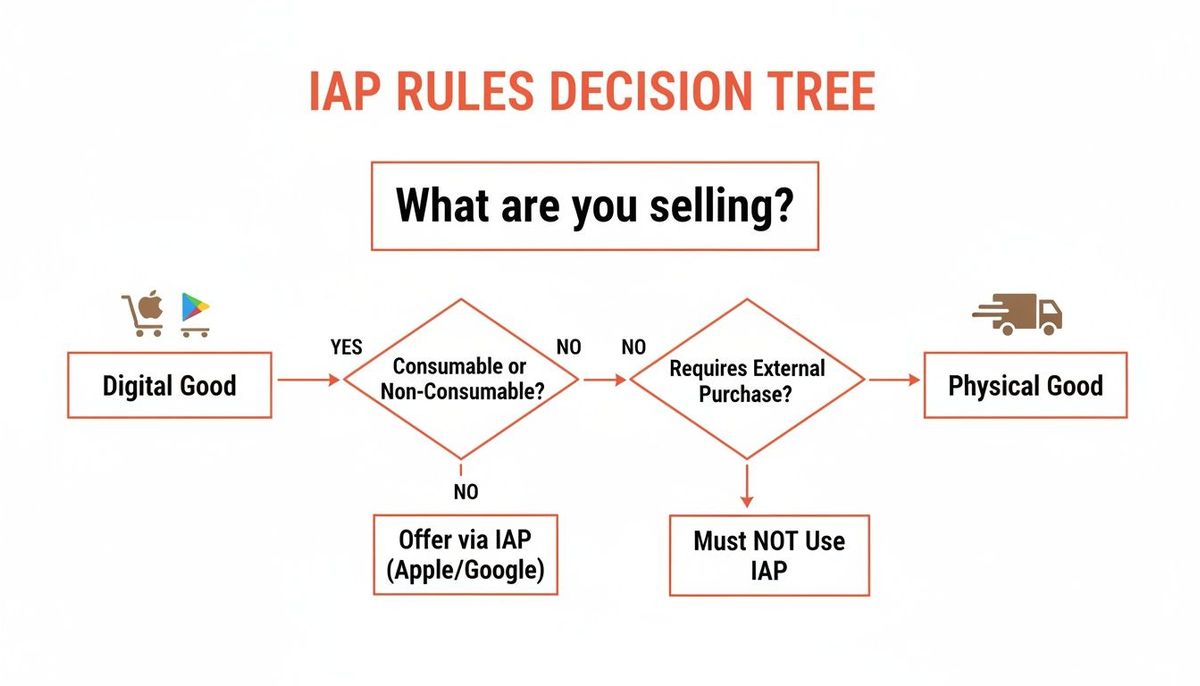
This simple visual guide is everything. It highlights the critical line in the sand that the platforms have drawn, which dictates the entire payment architecture you're allowed to build. This choice is especially vital in high-growth markets. Gaming completely dominates the IAP world, powering the market’s jump from $225.37 billion in 2025 to a projected $922.89 billion by 2033 at a 19.27% CAGR. Much of that 18.1% segment growth is fueled by mobile adoption in markets like China and India, as noted in the full in-app purchase market report. Choosing the right architecture is also key for scaling; for more on that, check out our guide on building a resilient API for microservices.
Best Practices For Startup Monetization Success
Just slapping a price tag on your app isn't a monetization strategy. For a startup, real success with in-app purchases comes from a deliberate playbook—one that methodically turns free users into loyal, paying customers and keeps them subscribed for the long haul.
It's about moving past theory and into battle-tested tactics for pricing, user experience, and analytics.
The numbers don't lie. The mobile economy has shifted its focus from pure user growth to smart monetization. In 2025, global mobile in-app purchase revenue hit a staggering $167 billion. That’s a healthy 10.6% yearly jump, even as new app downloads barely budged, growing by only 0.8%. The message is loud and clear: sustainable revenue isn't just a goal; it's the goal.
Design a Compelling Paywall
Think of your paywall less as a gate and more as a sales pitch. Too many startups throw up a barrier that just demands cash. A great paywall does the opposite—it clearly and concisely shows the user exactly what incredible value they'll unlock by upgrading.
Your paywall should use benefit-driven language, sprinkle in some social proof (like "Join 50,000+ happy subscribers!"), and use clean visuals. The goal is to make the upgrade feel like a smart investment, not a frustrating obstacle.
Actionable Insight: Frame your premium features around the problems they solve. Instead of listing "Unlock Advanced Filters," try "Create stunning photos in seconds." For a fitness app, change "Access all workout plans" to "Reach your fitness goals faster with a personalized plan." This simple shift connects the feature directly to the user's real desire.
Never stop testing. Does a short video testimonial outperform a bulleted list of features? Does offering a steep discount on an annual plan boost your average revenue per user? Constant iteration is the name of the game.
Map and Optimize Your Conversion Funnel
You can't fix what you can't see. Using analytics tools, you need to map out every single step a user takes, from the moment they open the app to the second they complete a purchase. This creates a conversion funnel that will instantly reveal where users are dropping off.
Once you spot the friction points, you can tackle them head-on.
- High drop-off at the paywall? This is a huge red flag that your value proposition isn't landing, or the price feels too steep for the perceived benefit.
- Abandoning the purchase process? Maybe users are getting confused on the payment screen itself. This could signal a clunky UI or a lack of trust.
For instance, if you notice users tapping "Subscribe" but then bailing, it might be because the official App Store or Google Play confirmation pop-up feels intimidating. A simple, reassuring message right before, like "You'll confirm your subscription on the next screen," can make all the difference.
A/B Test Pricing and Tiers
Finding the perfect price is more art than science, and it’s always a journey of discovery. Never, ever assume your first price is the best price. A/B testing different price points and subscription tiers is absolutely essential to maximizing your monthly recurring revenue (MRR).
The key is to test one variable at a time to get clean, reliable data. You might pit a $9.99/month plan against a $12.99/month plan to see how conversion rates are affected. Or, you could test your single "Pro" tier against a new "Pro" and "Pro Plus" offering to see if more choice actually leads to more revenue. For example, the meditation app Calm famously tested different introductory offers and found that a 7-day free trial converted significantly better than a simple monthly price, boosting their subscriber growth.
These tactics are powerful, but they work best as part of a larger strategic framework. If you're building out your game plan, there are many great resources on how to monetize an app that can give you a broader perspective.
Burning Questions About In-App Purchases
Founders wrestling with mobile monetization always seem to circle back to the same few questions. They’re the big ones, the kind where the right answer can shape your app’s entire financial future.
Let's cut through the noise and tackle these head-on.
Can I Just Use Stripe to Dodge the App Store Fees?
This is the big one. And the short answer is almost always no—at least not for digital goods or services inside your app.
It’s a common misconception, but Apple and Google are crystal clear on this: if a user consumes the feature, content, or service inside your app, you must sell it using their native IAP systems. Period.
Trying to funnel users to your website to pay with Stripe for a subscription or to unlock a feature is a direct violation of their terms. It’s the fastest way to get your app rejected or, worse, pulled from the store.
- Native IAP is for: Digital subscriptions (Spotify Premium), unlocking "pro" features (Facetune), buying virtual currency (Roblox Robux), or paying to remove ads.
- Stripe is for: Selling physical merchandise (Nike), charging for real-world services like a coaching session (BetterHelp), or booking an in-person class (ClassPass).
That 15-30% platform commission isn't a suggestion; it's the cost of doing business in their world. You have to bake this into your financial model from day one. It's not just a best practice—it's a survival requirement.
What's the Difference Between an IAP and a Subscription?
This trips people up, but the relationship is simple. A subscription is just one specific, incredibly powerful type of in-app purchase.
Think of "in-app purchase" as the parent category for every transaction that happens inside your app.
A subscription is just a recurring in-app purchase. A non-consumable IAP is a one-time purchase to unlock something forever. A subscription gives ongoing access for a recurring fee.
For example, buying a "Remove Ads Forever" feature is a classic one-time, non-consumable IAP. Paying $9.99/month to access a library of premium content is an auto-renewing subscription—a specific flavor of IAP built for predictable, recurring revenue.
How Hard Is It to Switch IAP Systems Later?
Migrating your in-app purchase backend is brutally difficult. This isn’t like swapping out one analytics tool for another.
Your subscription logic is deeply woven into user accounts, platform-specific receipts from Apple and Google, and your own server. A messy migration guarantees lost subscribers, infuriating billing errors, and a user experience nightmare.
Imagine trying to change the engine of a car while it's speeding down the highway. That’s the level of complexity we're talking about.
Entitlements—the logic that knows which users have paid for what—have to be transferred flawlessly. If you build your system directly on Apple and Google's native APIs, you’re on the hook for managing that incredibly complex data transfer yourself.
This is exactly why so many successful apps plan for this on day one. Using a third-party tool like RevenueCat from the start creates an abstraction layer. It makes your subscription data portable and future-proofs your business against these kinds of painful, high-stakes technical hurdles.
At Vermillion, we build revenue-ready mobile apps with optimized IAP and subscription systems from the start. If you're a funded startup looking to build a product that proves traction and maximizes MRR, let's build it right, together.