React Native vs. Native: A Startup Founder's Guide

The real tension in the React Native vs. native debate comes down to this: React Native gets you to market with incredible speed and efficiency, while native development delivers raw, unmatched performance for apps that push the hardware to its limits.
For a founder, this isn't just a tech choice. It's a strategic decision that directly impacts your burn rate and your ability to prove your concept before the runway disappears.
The Startup Founder's Core Dilemma
Picking a mobile stack is a business decision first, a technical one second. When you've got funding in the bank, the pressure to launch, learn, and show traction is immense. The choice between React Native and native (that’s Swift for iOS and Kotlin for Android) is a classic trade-off: speed-to-market versus deep, platform-specific power.

This guide isn't for academics. It's a founder's playbook, designed to give you a clear framework for a decision that lines up with your real-world goals—whether that’s rapidly testing a new marketplace or perfecting buttery-smooth animations for a premium consumer app.
Understanding the Fundamental Difference
The core distinction is simple: how the code is written and run.
With native development, your team builds two completely separate apps from scratch. One for iOS, one for Android. This gives you absolute control and the best possible performance because you’re speaking the device’s "native" language.
- Practical Example: If you’re building an app with a custom camera filter that needs real-time processing, a native approach lets your iOS team use Apple's
Core Imageframework and your Android team useOpenGL ESfor direct, high-speed GPU access.
React Native, on the other hand, lets your team build a single application using one JavaScript codebase that works on both platforms. It's a clever bridge that translates your code into the native user interface elements people expect. This "write once, run anywhere" approach is where all the speed and cost savings come from.
- Actionable Insight: For a content-driven app, like a news reader, you can write the UI for an article screen once in React Native. That single component will automatically render as a native
UIViewon iOS and a nativeViewon Android, saving you from building and maintaining two separate screens.
For the vast majority of startups—especially those building marketplaces, social platforms, or healthtech apps—React Native provides a powerful path to launch a high-quality MVP on both iOS and Android simultaneously, maximizing return on investment.
To make the right call, you need to see how these two paths stack up across the metrics that actually matter to your business.
At a Glance: React Native vs. Native
This table cuts straight to the chase, outlining the core differences that will shape your decision.
| Feature | React Native | Native (Swift/Kotlin) |
|---|---|---|
| **Codebase** | Single JavaScript codebase for iOS & Android. | Separate, platform-specific codebases. |
| **Development Speed** | **Significantly faster**; launch on both platforms at once. | Slower; requires two separate development cycles. |
| **Cost Efficiency** | **More affordable**; one team, one codebase. | Higher cost; needs two specialized dev teams. |
| **Performance** | Near-native for most apps. | **Highest possible performance**; best for intensive tasks. |
| **Team Hiring** | Easier; huge pool of JavaScript developers. | Harder; requires specialized Swift and Kotlin experts. |
| **Best Use Cases** | MVPs, marketplaces, e-commerce, content apps. | AR/VR, high-performance games, heavy animations. |
Comparing Development Speed and Time-to-Market
In the startup world, speed is survival. Getting your app into users' hands, collecting feedback, and iterating isn't just a goal—it's often the single biggest predictor of success. This is where the React Native vs. native debate gets really interesting. React Native was built for one thing above all else: velocity.
That "write once, run anywhere" mantra isn't just a technical bullet point; it’s a strategic advantage that can radically shorten your time-to-market.
With a purely native approach, you're essentially funding and managing two separate projects. Two teams, two codebases, and two release cycles for every single feature, bug fix, or design update. The overhead required to keep iOS and Android in sync is a constant drag on momentum, slowing everything down.
The Power of a Single Codebase
React Native collapses all that complexity. A single team of JavaScript developers can build, test, and ship features for both platforms at the same time. This doesn't just cut your work in half; the unified workflow creates a compounding effect on your development speed.
Practical accelerators are baked right into the framework. Features like Hot Reloading let developers see UI changes instantly without a full recompile.
- Actionable Insight: Imagine your designer wants to change a button color from blue to green. With Hot Reloading, a React Native developer makes the one-line change in the code, and it updates on their test device in under a second. In a native workflow, this same change requires a full recompile, which can take several minutes, killing productivity flow.
The whole philosophy is built around moving faster with a single team and a single codebase.

Quantifying the Speed Advantage
This speed boost isn't just a theory. Imagine you’re a Series A founder trying to launch an MVP on both iOS and Android before your runway runs out. You need to prove traction with push notifications and subscriptions—fast.
This is where you’d feel the impact of a potential 33% faster development speed with React Native. Real-world analysis from development agencies often shows 30-35% reductions in total coding effort. That can be the difference between launching in weeks versus months.
The strategic impact here is huge. It means you can launch A/B tests faster, respond to critical user feedback in days instead of weeks, and find product-market fit before you burn through your capital.
A Practical Example: A Subscription Wellness App
Let's say you're building a subscription-based wellness app. The core features are user login, content streaming, push notifications, and in-app subscriptions through Apple and Google.
- Native Approach: You’d need two teams. The iOS team builds with Swift, integrating Apple's StoreKit. The Android team builds with Kotlin, integrating the Google Play Billing Library. Any change to the subscription logic or UI requires double the work, separate pull requests, and dual QA testing.
- React Native Approach: A single JavaScript team can use a library like
react-native-purchases(RevenueCat) to handle both StoreKit and Play Billing logic at once with a unified API. A new promotional offer screen is built one time and immediately works on both platforms. The implementation and testing time is effectively cut in half.
This streamlined process gets your app to market faster and dramatically reduces management overhead. To see this in action, you can track key performance indicators like DORA Metrics. A leaner team shipping from a single codebase will almost always have a higher deployment frequency and a shorter lead time for changes.
For a deeper dive into the numbers and mechanics, you can learn more about how React Native can speed up mobile app development in our detailed guide.
A Practical Cost Analysis for Development and Maintenance
Beyond the initial build, the real cost of a mobile app shows up over the long haul. This is where the React Native vs. native debate stops being a technical argument and becomes a strategic financial one. For a startup, that total cost of ownership—from developer salaries to bug fixes—is the difference between managing your burn rate and running out of cash.
React Native's single codebase delivers a straightforward and massive financial edge. Instead of funding two separate engineering teams for iOS and Android, you're investing in one. That immediately cuts your biggest line item: payroll.
Breaking Down the Core Costs
When you build native, you aren't just paying for two developers; you're paying for specialized, high-demand skills in Swift and Kotlin. The talent pool for JavaScript and React is just plain bigger and, as a result, generally more affordable to hire from. This makes building a strong team faster and less expensive.
Think about these core cost drivers:
- Developer Salaries: Finding senior Swift and Kotlin developers is a competitive, expensive hunt. Finding skilled JavaScript/React engineers is significantly easier.
- Agency Fees: If you hire an agency, a React Native project usually needs a smaller, more focused team, which means lower engagement costs.
- Operational Drag: Managing two projects creates hidden costs. You're doubling the project management overhead, complicating QA with separate testing cycles, and burning time trying to sync up feature releases.
The Long-Term Maintenance Advantage
The first build is just the starting line. The majority of an app's lifetime cost comes from maintenance, bug fixes, and adding new features. This is where React Native’s efficiency really starts to compound.
A bug fix or a new feature gets built once, then deployed to both the App Store and Google Play at the same time. With a native approach, that exact same work has to be done, tested, and released twice. You've effectively doubled your long-term maintenance budget right out of the gate.
- Practical Example: A user reports a bug where their profile picture isn't updating correctly. With React Native, your developer debugs the single piece of JavaScript logic handling the image upload. Once fixed, the patch is ready for both iOS and Android. With a native approach, you have two separate investigations. Maybe the bug is in the iOS networking layer for one team and an Android image caching library for the other. It's double the work and double the headache.
A Hypothetical Startup Budget
Let's run the numbers for a seed-stage startup with a $250,000 development budget. The way that cash gets spent looks dramatically different depending on the path you choose.
Native Development Budget Allocation:
- Initial Build ($180K): Two separate teams (iOS and Android) build the MVP, which takes longer. A huge chunk of the budget is gone right here.
- First-Year Maintenance ($50K): Ongoing costs for bug fixes and small updates across two codebases.
- Growth Initiatives ($20K): What's left over buys you very little in terms of user acquisition, analytics, or A/B testing tools.
React Native Development Budget Allocation:
- Initial Build ($120K): A single team builds the MVP much faster and more efficiently.
- First-Year Maintenance ($30K): Maintenance costs are lower because you’re only managing one codebase.
- Growth Initiatives ($100K): A massive amount of capital is freed up to pour directly into user acquisition, marketing, and integrating growth tools like better analytics or subscription platforms.
This highlights the real strategic difference. React Native doesn’t just lower your initial bill; it shifts your capital away from redundant engineering and toward the things that actually drive business growth. For a complete breakdown of how these numbers add up, check out our guide on understanding React Native app development costs. When your main goal is proving traction to secure the next round, that kind of financial flexibility is priceless.
Evaluating Performance and User Experience
Let's get straight to the most debated—and misunderstood—part of the React Native vs. native conversation. For years, the story was simple: native apps were fluid and fast, while cross-platform was a clunky compromise. That narrative is dead. And if you're making a business decision today, you need to understand why.
The old performance penalty came from React Native's "bridge," a communication layer that shuttled information between the JavaScript world and the native UI. Under heavy loads, like complex animations or data-heavy lists, this bridge would get clogged up. The result? Dropped frames and that sluggish feeling users hate. That's simply not how it works anymore.

The New Architecture Performance Shift
React Native's New Architecture completely changes the game. With components like Fabric and TurboModules, it ripped out the old bridge and enabled JavaScript to communicate directly—and synchronously—with the native side. This is a fundamental rewrite, and it makes a massive difference in how responsive an app feels.
For a startup, this means the performance gap has practically vanished for most use cases. The user experience is indistinguishable for about 90% of typical business and consumer apps. You’re no longer trading speed for efficiency.
React Native vs Native Performance Benchmarks
| Metric | React Native (New Architecture) | Native (Swift/Kotlin) | Implication for Startups |
|---|---|---|---|
| **Frame Rate (FPS)** | **53-56 FPS** | **60+ FPS** | Visually identical smoothness for UI interactions. The difference is imperceptible to the human eye. |
| **Memory Usage** | **~30MB** | **~20MB** | The difference is marginal on modern devices and doesn't impact overall performance for most apps. |
| **Battery Drain** | **~16%** | **~12%** | A minor difference that users are unlikely to notice in daily use. |
These benchmarks show that for marketplaces, social platforms, fintech, or healthtech apps, the performance conversation has shifted. It's not about compromise anymore; it's about near-parity.
The takeaway is clear: for most applications, React Native's performance is no longer a concession. It’s a powerful, production-ready solution proven at massive scale by companies like Microsoft in their Office and Xbox apps.
Defining a "Native-Like" User Experience
A great user experience isn't just about raw FPS; it's about how an app feels. Does it scroll without a stutter? Does it open instantly? Does it react the moment you tap? You have to pair your development choice with efficient UI validation with design testing to make sure the interface feels right in a user's hands.
Here’s a practical breakdown of how React Native now handles these core UX elements:
- Scroll Smoothness: Native apps have always owned this. Scrolling a long list is buttery smooth. Today, with React Native's New Architecture and highly optimized libraries like Shopify's
FlashList, the experience is virtually identical. Actionable Insight: For an e-commerce app displaying thousands of products, usingFlashListin React Native ensures the scroll performance rivals a nativeUICollectionView(iOS) orRecyclerView(Android). - App Startup Time: Native still has a slight, almost theoretical edge here because it doesn't need to load a JavaScript engine. But with optimizations from the Hermes engine, React Native startup times are incredibly competitive, often loading within a fraction of a second of their native counterparts.
- Responsiveness: This is all about how fast the app reacts to a tap. By killing the bridge, React Native's touch responsiveness is now on par with native for almost all standard UI interactions.
When Native Is Still the Undisputed Champ
Despite all these advancements, let's be objective. Native is still the king for a specific class of apps—the ones that push a device's hardware to its absolute limit.
You should go native, no questions asked, if your app's core feature is:
- Augmented Reality (AR) or Virtual Reality (VR): These demand deep, low-level access to device cameras and sensors. Any latency here ruins the experience.
- Complex 3D Rendering: If you’re building an advanced modeling app or a heavy data visualization tool, you need direct GPU access.
- High-Performance Gaming: For games with intensive physics engines and console-level graphics, nothing beats direct hardware access.
- Practical Example: An app like Snapchat, which relies heavily on real-time, high-performance facial tracking and AR lens filters, is a perfect candidate for native development. The tiny bit of latency introduced by a cross-platform solution would make the core feature feel broken.
But for the vast majority of startups, these are edge cases. The goal is usually to build a scalable, data-driven business, not a graphics engine. In that world, modern React Native isn't just "good enough"—it's excellent.
Building Your Team and Planning for the Long Term
The React Native vs. native debate isn't just about code. It's a strategic HR decision. It dictates who you can hire, how you structure your teams, and how you’ll keep the lights on for years to come. This choice defines your operational reality long after launch day.
React Native's biggest pull here is the absolutely massive global talent pool of JavaScript and React developers. Frankly, these skills are just more common—and usually more affordable—than the specialized expertise needed for Swift (iOS) and Kotlin (Android).
For a startup, that means building a solid team faster and without breaking the bank.
The Dynamics of Team Structure
The difference in how you'll structure your team is stark, with immediate, real-world consequences.
- Native Approach: You’re on the hook for hiring, onboarding, and managing two separate engineering teams—one for iOS, one for Android. This isn't just double the headcount; it's double the communication overhead and double the project management. You also run the very real risk of creating two slightly different products as each team interprets requirements their own way.
- Actionable Insight: Imagine your PM specifies a new user profile screen. The iOS team might build it using Apple’s standard navigation patterns, while the Android team uses Google's Material Design. The result? Two different user experiences, creating brand inconsistency and a headache for your support team.
- React Native Approach: You build one, unified engineering team. This single unit works from a single codebase, which forces consistency and massively simplifies communication. One project manager, one set of sprints, one product roadmap. Both platforms move forward together.
A unified team does more than just cut headcount. It aligns your entire engineering culture around a single product vision. This creates tighter collaboration and a more efficient workflow, which is exactly what a startup needs in its early days.
The Reality of Long-Term Maintenance
Getting your app launched is just the starting line. The real work—the bulk of your engineering effort over the next few years—is in maintenance, updates, and new features. A unified codebase makes this entire lifecycle drastically simpler.
Think about a common scenario a few months after launch: a critical security flaw is found in a library you use, or a new OS update from Apple or Google breaks something.
With React Native, your team investigates once, develops one fix, and deploys it to both the App Store and Google Play. The entire pipeline—coding, QA, release management—is handled as a single piece of work.
With a native setup, you instantly double the workload. Two separate teams have to independently investigate, patch, test, and release the fix. That's double the QA, double the release coordination, and twice the opportunity for human error. It’s a permanent tax on your operational efficiency.
For a deeper dive into putting together the right people, our guide on how to hire a mobile app developer lays out actionable strategies for both paths.
Ultimately, choosing React Native is a bet on operational simplicity. It allows a lean startup to pour its limited resources into building features that actually drive growth, not on the redundant work required to keep two separate platforms in sync.
An Actionable Framework for Making Your Decision
The whole React Native vs. native debate isn't about finding a single "best" technology. It’s about matching the right tool to your business strategy. All the back-and-forth on speed, cost, and performance boils down to this one moment of decision. This framework is designed to cut through that noise and give you clear, situational advice based on where your startup is right now.
There's no universally correct answer here. It all comes down to your specific goals, market, and what your app absolutely must do well. Let's break it down into real-world scenarios.
Scenario-Based Recommendations
Your choice should be a direct reflection of your business priorities. Are you optimizing for speed-to-market and stretching your runway, or are you building an experience that requires deep, hardware-level performance?
- Choose React Native if: Your main goal is to validate a business idea quickly on both iOS and Android. This is the go-to path for most marketplaces, social platforms, healthtech apps, and e-commerce stores.
- Practical Example: A founder building a "Tinder for dog walkers" MVP needs to test the core concept: matching profiles and in-app chat. React Native is perfect because it allows them to launch on both platforms simultaneously with minimal investment, focusing all their resources on proving market demand.
- Choose Native if: Your app's killer feature is fundamentally tied to the phone's hardware. Think augmented reality, real-time video processing, high-performance gaming, or anything that needs intense background processing or direct GPU access.
- Practical Example: A startup creating a mobile video editing app that applies complex, multi-layered effects in real-time must choose native. This ensures they have direct access to the device's GPU for rendering, which is impossible to achieve with the same level of performance through a cross-platform abstraction.
This decision tree gives you a clean visual for how team structure plays into the choice.
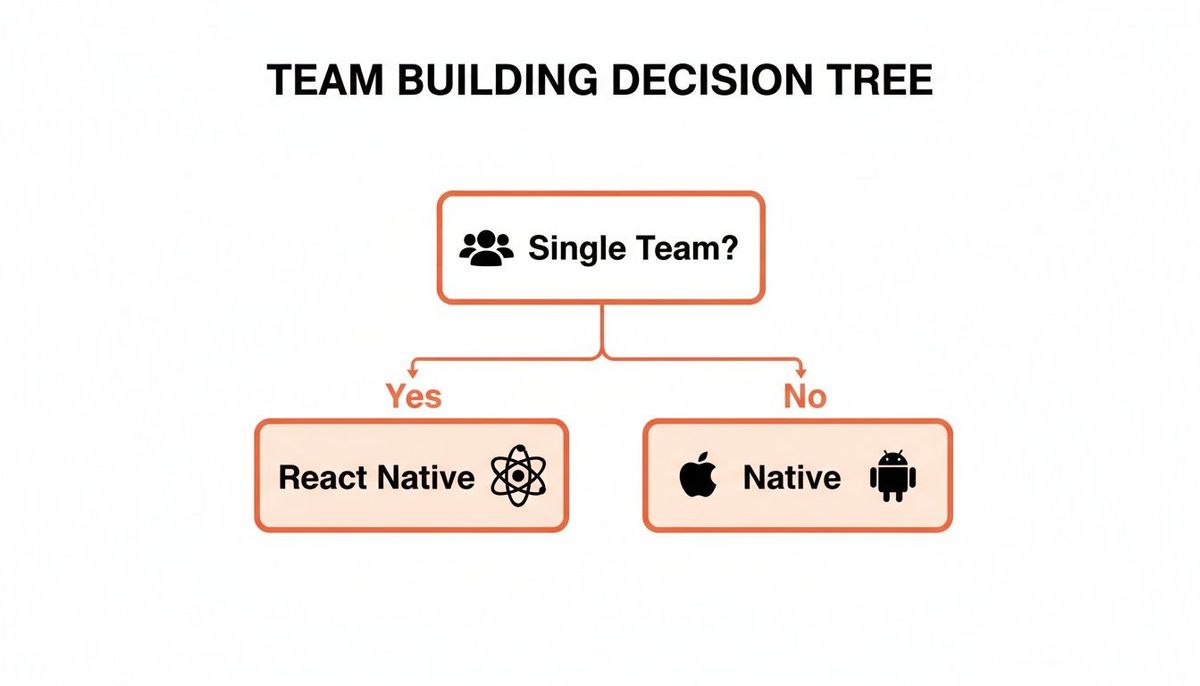
As you can see, if you're building a single, unified engineering team, React Native is the logical choice. If you're planning to manage separate, specialized teams, that naturally aligns with the native approach.
Practical Decision Checklists
Run through these questions. Your answers will point you in the right direction.
Go with React Native if you're nodding "yes" to most of these:
- Are you a seed or Series A startup? You live and die by capital efficiency. Getting to market before your runway disappears is priority number one.
- Is your business a marketplace, social app, or service? The user experience hinges on things like subscriptions, notifications, and content—not crazy hardware integrations.
- Do you need to launch on both iOS and Android at the same time? A single codebase makes this exponentially faster and more manageable for a small team.
- Is your team already skilled in JavaScript and React? You can hit the ground running with the talent you already have, avoiding a long and expensive hiring search.
Go with Native if you're nodding "yes" to most of these:
- Does your app's success depend on high-frame-rate animations or 3D rendering? You need every drop of performance you can get, and only native delivers that.
- Do you need deep integration with platform-specific APIs like ARKit or advanced camera controls? Direct access is non-negotiable.
- Are you well-funded and able to support two specialized engineering teams? You have the capital to invest in parallel development for total platform control.
- Is your target audience overwhelmingly on one platform? You could launch an iOS-first app with Swift, validate the idea, and then build for Android later.
Ultimately, the decision comes down to a simple trade-off. Choose React Native for speed, efficiency, and broad market access. Choose native for specialized, high-performance applications that push the boundaries of mobile hardware.
Got Questions? Let's Get Specific.
Even with a solid framework, you'll still have those nagging "what if" questions when it's time to make the final call between React Native and native. Let's tackle some of the most common ones I hear from founders.
Can React Native Actually Access Phone Features Like the Camera or GPS?
Yes, absolutely. This is one of the biggest myths out there. While going native gives you the most direct line to the hardware, React Native can tap into almost everything—the camera, GPS, accelerometer, Face ID, you name it.
It works by using "native modules," which are little bridges of Swift or Kotlin code that connect the device's features to your JavaScript app.
- Actionable Insight: You don't usually have to build these yourself. For something like implementing Apple Pay or Google Pay, you'd pull in a well-maintained library like
react-native-payments. This gives your JavaScript code full access to the native payment UIs without you ever having to write a line of Swift or Kotlin.
Is It Possible to Mix React Native into an Existing Native App?
Yes, and this is a killer strategy for established apps looking to move faster. Many companies with mature native apps will drop React Native screens in for new features. It's often called a "brownfield" approach, and it lets them build new stuff faster without touching their stable, core codebase.
A classic example is adding a new promo or events screen. Instead of building it twice for iOS and Android, a company can build it once in React Native and embed it into both native apps. They just saved a massive amount of time and money.
This hybrid model gives you the best of both worlds. You get the speed of React Native for less critical features without throwing away a perfectly good native application you've already invested in.
Ready to build a mobile app that drives revenue and proves you have traction? At Vermillion, we're more than just developers; we're your product partners. We build revenue-ready React Native apps with a performance model tied directly to your business KPIs. Find out how we build for growth.