Decoding React Native App Development Cost

When you start thinking about building a new mobile app, one of the first questions—usually the first question—is always about the budget. Let's get straight to it. A React Native app can cost anywhere from $15,000 for a simple Minimum Viable Product (MVP) to well over $300,000 for a complex, enterprise-grade application.
The final number really depends on the app's complexity, the features you need, the polish of the design, and, of course, the development team you partner with.
Your Quick Guide to React Native App Costs
Understanding the financial side of things is absolutely essential before you write a single line of code. React Native is a popular choice for a reason: it lets you build for both iOS and Android from a single codebase, which creates some serious efficiencies right out of the gate.
One of the biggest draws for businesses is the potential for significant cost savings. You're looking at an impressive 25-50% cost reduction compared to building two separate native apps. For example, if building separate native iOS and Android apps costs $100,000, a React Native version might only cost $50,000-$75,000. This is because you're paying for one development team and one codebase, not two.
App Cost Tiers Explained
To give you a clearer picture, let's break down the typical investment into three tiers. Each level lines up with a different scope of work, timeline, and feature set, helping you match your business goals to a realistic budget.
- Simple MVP: Perfect for testing a core idea with your first users. Actionable Insight: Focus on solving just one problem exceptionally well. For a task manager app, this means creating and checking off tasks—nothing more.
- Medium Complexity: For businesses launching a more polished product with standard features. Actionable Insight: Prioritize features that drive engagement, like push notifications or social logins, to build an initial user base.
- High Complexity: Geared toward established companies that need advanced, custom functionality. Actionable Insight: Plan for a phased rollout. Launch core features first and introduce complex additions like AI-powered recommendations in later updates based on user data.
The core idea here is to start with what’s essential. An MVP validates your market without a massive upfront investment. It allows you to build, measure, and learn before you scale up your features—and your budget.
Getting a handle on these tiers gives you a solid snapshot of your potential investment. Our guide to **React Native development** digs deeper into how we build revenue-ready products within these ranges.
To make this more concrete, the table below gives a practical overview of what to expect at each level of complexity.
React Native App Cost Estimates by Complexity
This table provides a quick look at typical costs, timelines, and features for React Native apps based on how complex they are.
| Complexity Level | Estimated Cost Range | Typical Timeline | Example Features |
|---|---|---|---|
| **Simple App (MVP)** | **$15,000 – $35,000** | **2–3 Months** | Basic user login, simple user profiles, core functionality, standard UI components |
| **Medium Complexity** | **$35,000 – $80,000** | **3–6 Months** | Social media integration, geolocation, push notifications, basic admin panel |
| **High Complexity** | **$80,000 – $300,000+** | **6–12+ Months** | Real-time chat, video streaming, AI/ML features, advanced analytics, custom UI |
Keep in mind, these are ballpark figures. The real cost drivers—which we'll explore next—are in the details of your specific project.
The Core Factors That Shape Your Budget
While ballpark estimates give you a starting point, the real magic is in understanding the why behind the numbers. Smart budgeting isn't about picking a number out of thin air; it's about knowing what drives it. Your final react native app development cost isn't one line item—it's the sum of several moving parts.
Think of it like building a custom home. The final price tag depends on the square footage, the quality of the marble you choose for the kitchen, and how wild the architectural plans are. Your app's cost works the same way, defined by its digital architecture and the complexity of its features.
Let's break down the core elements that will really move the needle on your budget.
App Complexity: The Real Cost Driver
"App complexity" isn't just jargon—it's the single biggest factor dictating your final cost. It determines the scope, the technical hurdles, and ultimately, the number of hours your development team will need to put in.
A simple app is like a digital brochure. It shows information, has a few buttons, and that’s about it. A complex app, on the other hand, is a living, breathing ecosystem with dozens of interconnected parts.
To make this real, let's look at a few examples:
- Simple: A basic pomodoro timer app. It has a start/stop button and a timer display. All logic is self-contained on the device, requiring no backend or APIs. Actionable Insight: Apps like this can often be built in under 150 hours.
- Medium: A restaurant reservation app. Users can log in, view restaurant profiles, see available time slots, and book a table. This needs a backend to manage users, restaurants, and reservations, plus an admin panel for restaurants to manage their listings. Actionable Insight: This requires careful database design to handle relationships between users, restaurants, and bookings efficiently.
- High: An app like Airbnb. It requires real-time messaging, a complex search with many filters (price, location, amenities), a two-sided review system, a secure multi-vendor payment gateway, and a sophisticated admin backend for managing disputes and listings. Actionable Insight: The real-time messaging feature alone could take 300-500 hours to build and test properly.
Each level up adds more dependencies and trickier logic, which translates directly into more development hours and a bigger budget.
The Value of Professional UX/UI Design
It's tempting to skimp on design to save a few bucks upfront, but that's a classic mistake. User experience (UX) and user interface (UI) are the bedrock of user retention. Great design isn't about making your app "pretty"—it's about making it intuitive, effortless, and even enjoyable to use.
A polished and intuitive user interface is not a luxury—it's a necessity. Data shows that a well-designed UI can boost conversion rates by up to 200%, and a better UX design could yield conversion rates up to 400%. This investment pays for itself through higher user engagement and retention.
Practical Example: For an e-commerce app, a poor UX might require five taps to complete a purchase, causing users to abandon their carts. A great UX, guided by user research, might reduce this to three taps, directly increasing sales. This is a tangible return on your design investment.
Backend Infrastructure and API Integrations
The frontend of your app is what users see and touch, but the backend is the engine humming away behind the scenes. This is a huge cost driver, covering everything from the server logic to the database that stores all your user information. A well-built backend is what makes an app fast, reliable, and able to handle growth.
On top of that, almost no app works in a silo. They need to talk to other services to get things done. We call these third-party API integrations, and they're everywhere:
- Payment Gateways: Using services like Stripe or Braintree to handle transactions without you having to build a bank from scratch.
- Mapping and Geolocation: Integrating the Google Maps API for any location-based features.
- Social Logins: Letting users sign up with one click using their Google, Apple, or Facebook accounts.
- Communication Tools: Plugging in services like Twilio for sending text messages or powering in-app chat.
Actionable Insight: When planning your budget, research the pricing tiers for each third-party API you intend to use. For example, the Google Maps API has a generous free tier, but heavy usage can lead to significant monthly costs. Factoring these operational costs in from day one prevents future surprises.
Each of these integrations adds another layer of complexity. A good chunk of your budget will also go toward implementing robust React Native application security best practices to keep user data safe. Building this strong foundation is a core part of how React Native can speed up mobile app development without cutting corners, making sure your app is secure and ready to scale from day one.
How Features Translate Into Final Costs
Every single feature you add to your app is another line item on the final invoice. It's that simple. But a feature isn't just a button—it's a tangled web of design work, front-end code, back-end logic, and testing that eats up time and money. Getting a handle on this is the key to keeping your React Native app development cost from spiraling out of control.
Think of it like building a house. The foundation and frame are your base cost. Adding a standard kitchen and two bathrooms is expected. But then you decide you want a home theater, a wine cellar, and a rooftop deck. Each of those additions dramatically increases the complexity, timeline, and final price tag. Your app is no different.
This diagram shows how your feature choices are the starting point for everything that drives up cost: complexity, design, and the backend power needed to run it all.
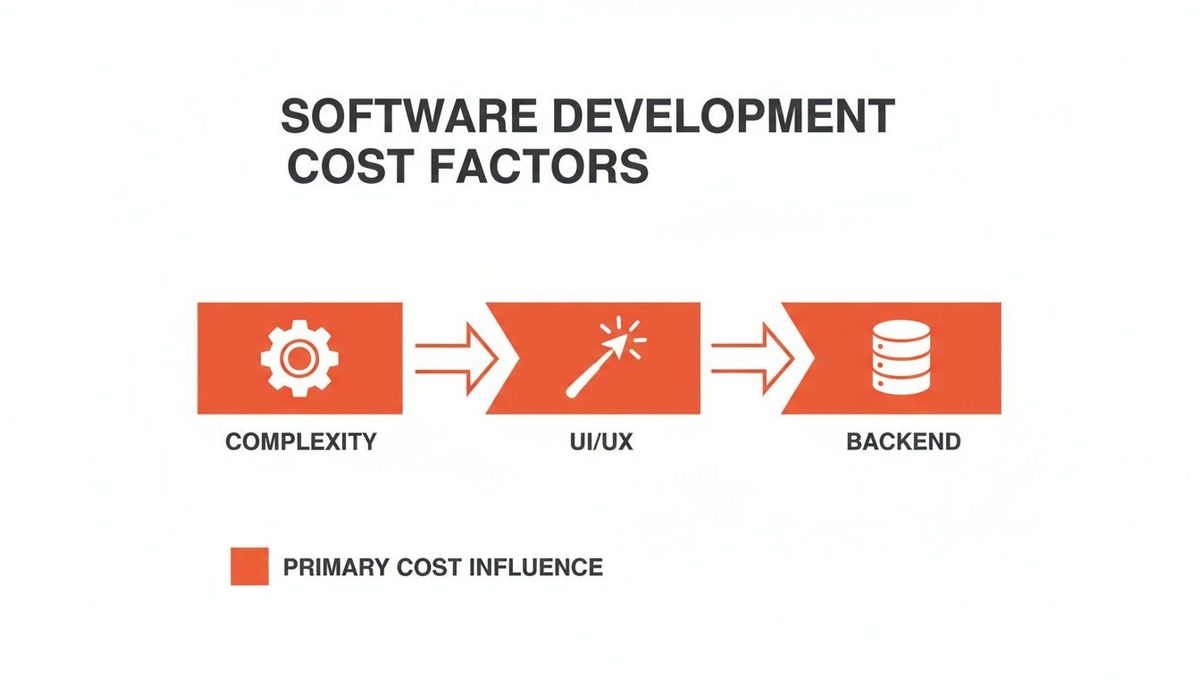
As you can see, the features you pick have a direct domino effect on the rest of the project, dictating the engineering and design effort required.
To give you a clearer picture, here’s a breakdown of how different feature sets impact the budget.
Feature Cost Breakdown for React Native Apps
This table provides a high-level look at the estimated costs for common and advanced features in a React Native application, helping you map your vision to a realistic budget.
| Feature Category | Example Features | Estimated Cost Impact |
|---|---|---|
| **Foundational** | User Login (Email/Social), Profiles, Static Pages (About, FAQ) | **$5,000 - $15,000** |
| **Engagement** | Push Notifications, Geolocation & Basic Maps, In-App Chat | **$10,000 - $30,000** |
| **Monetization** | In-App Purchases, Subscriptions (via [RevenueCat](https://www.revenuecat.com/)), Basic E-commerce | **$12,000 - $35,000** |
| **Advanced** | Real-Time Data Sync, Video/Audio Streaming, AI/ML Features | **$25,000 - $120,000+** |
| **Platform-Specific** | HealthKit/Google Fit Integration, Advanced Bluetooth (BLE) | **$15,000 - $50,000** |
These are, of course, ballpark figures. The real cost comes down to the depth of each feature. "In-app chat" could be a simple direct message system or a full-blown Slack competitor—two very different price tags.
Foundational Features: The Building Blocks
Every app needs a skeleton to hang the rest of the features on. These are the non-negotiables that users have come to expect as standard.
- User Authentication and Profiles: This is the front door to your app. It can be a simple email and password form or include social logins through Google, Apple, or Facebook. It also covers the boring-but-essential stuff like password resets.
- Static Content Screens: Think "About Us," "Terms of Service," or "Privacy Policy." They’re straightforward, but they still need to be designed, written, and coded into the app.
Actionable Insight: To save time and money here, use a Backend-as-a-Service (BaaS) like Firebase Authentication. It provides pre-built, secure login flows for email, social media, and more, cutting development time for this feature by over 50%.
Mid-Tier Features: Adding Engagement
Once the basics are in place, mid-tier features are what turn a static app into something genuinely useful and interactive. This is where you start needing more than just a simple screen and a database.
These features are where you start to see a significant jump in development hours. They move your app from a simple information tool to an interactive platform, directly impacting user retention and value.
Common mid-tier features include:
- Push Notifications: Nothing pulls a user back into an app like a well-timed notification. This requires integrating with services like Firebase Cloud Messaging, but the real complexity lies in building the logic for when and why a notification gets sent.
- Geolocation and Mapping: If your app needs to know where the user is—for deliveries, social events, or anything location-based—you'll need to integrate with a service like the Google Maps API or Mapbox. Just showing a pin is easy; tracking movement or calculating routes adds serious hours.
- In-App Purchases and Subscriptions: Want to make money? You'll need to navigate the tricky waters of Apple's and Google's payment systems. Services like RevenueCat make it manageable, but it’s still a complex integration with a lot of moving parts.
Practical Example: For a social events app, a "New event near you" push notification is an engagement feature. This requires combining geolocation data with push notification services and a backend job that periodically checks for relevant events for each user. This single feature involves multiple interconnected systems.
Advanced Features: The High-Ticket Items
Here’s where budgets really start to climb. Advanced features are technically demanding, require specialized engineers, and often need a powerful, scalable backend infrastructure to work.
One in-depth analysis of React Native app development costs shows that enterprise apps with these kinds of features can range from $75,000 to over $350,000. Just adding geolocation can tack on $12,000-$18,000, while media streaming can cost anywhere from $7,500 to a staggering $120,000, depending on what you need.
Here are a few high-ticket items that drive costs north:
- Real-Time Chat: Building a messaging system that feels instant like Slack or WhatsApp is a huge undertaking. It requires WebSockets for live communication, a system for storing message history, read receipts, and tying it all into push notifications.
- Video and Audio Streaming: Whether you’re building the next Netflix or Twitch, streaming media demands a robust server setup, content delivery networks (CDNs) to reduce latency, and complex player integrations on the device. It’s one of the most expensive features you can build.
- AI and Machine Learning Integrations: Features like personalized recommendation engines, image recognition, or AI-driven content feeds require data scientists and deep integration with platforms like TensorFlow or Google AI Platform.
By understanding how each feature translates into real development work, you can stop guessing and start making strategic decisions. It lets you prioritize what actually delivers value for your launch, ensuring your budget is spent on what matters most to your first users.
Of all the variables that can swing your app budget, one of the biggest has nothing to do with code, features, or design. It’s geography.
Where your development team is based can change your final react native app development cost more than almost anything else. Hiring a team in your city is a completely different financial conversation than partnering with one halfway across the world.
Think of it like manufacturing a physical product. You could make it locally with higher labor costs but get seamless, real-time communication. Or, you could move production overseas for a lower price tag, but you'd have to navigate time zone differences and potential quality control hurdles. App development works the same way; where your code gets written has a direct line to your final invoice.
A World of Difference in Hourly Rates
The global talent market is vast, and pricing is all over the map, driven by local economies and cost of living. This is exactly why so many founders and companies look beyond their borders. A project that costs six figures in San Francisco might be a five-figure investment when built by a sharp team in Eastern Europe or Southeast Asia.
To make this real, here’s a rough breakdown of what experienced React Native developers typically charge per hour in different regions:
- North America (USA & Canada): $100 - $180 per hour
- Western Europe (UK, Germany): $80 - $150 per hour
- Eastern Europe (Poland, Ukraine): $40 - $75 per hour
- Southeast Asia (India, Vietnam): $25 - $50 per hour
This isn't a small difference—it’s massive. A project estimated at 500 development hours could cost you anywhere from $12,500 with a team in Vietnam to $90,000 with a North American one. For the exact same app.
Beyond the Numbers: Communication and Quality
The cost savings are tempting, no doubt. But they don’t exist in a vacuum. Price is just one piece of the puzzle. You’re not just buying code; you’re choosing a partner, and how that partnership functions day-to-day is critical.
Working with a global team means you have to actively manage coordination. Time zones can be a drag, creating frustrating feedback loops where a simple question takes 24 hours to answer. Or, if you manage it well, it can become a strategic advantage, with work happening around the clock.
Communication is the currency of collaboration. A lower hourly rate is only a true saving if it doesn't come at the expense of clarity, speed, and quality. Misunderstandings from language barriers or cultural work styles can lead to expensive rework that completely wipes out those initial savings.
Actionable Insight: When vetting offshore teams, ask for a paid, small-scale discovery phase or a pilot project (e.g., building a single feature). This low-risk investment allows you to evaluate their communication skills, code quality, and project management style before committing to the entire project budget.
If you want to dig deeper, you can discover more insights about app development costs and how geography plays a central role. Ultimately, the goal isn't just to find the cheapest option. It’s to find the sweet spot—the right balance of cost, skill, and collaboration that just works.
Smart Ways to Reduce Your Development Costs
A high react native app development cost doesn't automatically buy you a successful app. In fact, some of the most successful products I've seen got their start with a lean, laser-focused approach. The secret isn't just about spending less; it's about spending smarter—making strategic choices that get you to market faster and prove your concept without breaking the bank.
This is your playbook for building something powerful without needing a massive budget. We're going to walk through some practical, battle-tested tactics for a lean and effective development cycle that prioritizes speed, efficiency, and real-world feedback from actual users.

Embrace the Minimum Viable Product
The single most effective way to control your costs is to adopt a Minimum Viable Product (MVP) mindset. An MVP isn't a cheap or unfinished version of your app. Think of it as a strategic tool designed to test your core business idea with the smallest possible investment.
Instead of building out a dozen features you think your users might want, you build the one or two essential features you know they need to solve a critical problem. Everything else is noise.
The goal of an MVP is maximum learning with minimum effort. It allows you to get real-world feedback from actual users before you commit tens or hundreds of thousands of dollars to building features that might not even matter.
Practical Example: Dropbox's famous MVP wasn't even a functional product. It was a simple explainer video demonstrating how file syncing would work. The video drove thousands of sign-ups overnight, validating their idea before they wrote a single line of production code. Your MVP could be equally simple.
This approach not only saves a ton of money upfront but also ensures that every dollar you spend afterward is guided by hard data, not just assumptions. To really nail this, you have to know how to use your development budget efficiently by zeroing in on features that deliver immediate value.
Leverage Pre-Built and Third-Party Solutions
One of the most common and expensive mistakes founders make is trying to build every single component from scratch. Why reinvent the wheel when a robust, well-supported solution already exists? The modern development world is packed with tools that can slash your build time.
For instance, using mobile app templates can give you a solid foundation, dramatically cutting down your timeline and costs. These tools provide ready-to-use UI components and screen layouts that your team can simply customize, saving hundreds of hours that would otherwise be spent on basic design and coding.
This strategy goes way beyond just the user interface. Integrating specialized third-party services is a cornerstone of any lean development project:
- Payments: Instead of building a PCI-compliant payment system from the ground up (a nightmare), integrate Stripe. Their APIs are incredibly powerful and handle all the complexity of transactions, security, and subscriptions for you.
- Backend Services: Use platforms like Firebase or AWS Amplify for things like user authentication, databases, and serverless functions. This lets you avoid managing complex server infrastructure, which is a full-time job in itself.
- Analytics: Plug in services like Mixpanel or Amplitude to track user behavior. There’s no need to build a custom analytics dashboard from scratch when these tools give you enterprise-level insights out of the box.
Actionable Insight: Before you decide to build any non-core feature (like chat, analytics, or a CMS), do a 30-minute search for a "headless" or API-based SaaS solution. In many cases, you can find a service that offers a free or low-cost tier that can be integrated in days, rather than weeks or months of custom development.
Your App is Live. Now What About the Bills?
Getting your app into the hands of users is a massive win, but it’s the starting line, not the finish. The financial part of the journey doesn't just stop; it just changes shape. The real react native app development cost has to include what comes after launch.
Too many founders burn through their entire budget getting to version 1.0, only to be blindsided by the recurring bills that start rolling in on day one. A solid rule of thumb? Plan to spend about 15-20% of your initial development cost every year just to keep the lights on and the engine running. For a $50,000 app, this means budgeting $7,500-$10,000 annually for maintenance.
What Does "Maintenance" Actually Pay For?
These aren't optional nice-to-haves. They're the non-negotiable costs that keep your app secure, fast, and available. Skip out on them, and even the most beautiful app will become a buggy, broken mess in a surprisingly short amount of time.
Here’s where that money typically goes:
- Server and Hosting Fees: Your backend code has to live somewhere. Whether you're on AWS, Google Cloud, or something else, your bill will scale directly with your user traffic and how much data you're storing.
- Third-Party API Subscriptions: That slick payment flow from Stripe, the interactive maps from Google Maps, or the analytics platform you rely on—they all send you a bill every month.
- Critical Bug Fixes: No code is perfect. As real people start using your app in unexpected ways, bugs will crawl out of the woodwork. You need a developer on call to squash them before they ruin the user experience and your App Store rating.
Think of post-launch costs like owning a car. The sticker price is just the beginning. You still have to pay for gas, insurance, and regular oil changes to keep it roadworthy. Your app is no different.
Keeping Up with a Moving Target
Beyond just fixing what's broken, your app has to evolve with the world around it. Every year, Apple and Google push out major new versions of iOS and Android. These updates introduce new security rules, different design standards, and sometimes break old code.
Practical Example: When Apple released iOS 14, they introduced significant changes to user privacy and ad tracking. Apps that didn't update their code to comply with these new rules faced warnings, reduced functionality, or even removal from the App Store. This is a real-world, recurring cost of doing business.
Your app has to be updated to stay compatible. If you don't, you risk features breaking, the app crashing on new devices, or even getting kicked out of the app stores entirely. This isn't about adding flashy new features; it’s the fundamental work required to protect your initial investment.
Still Have Questions?
You're not alone. When it comes to budgeting for an app, a lot of questions come up. Here are the straight answers to the most common ones we hear from founders.
Is React Native Really Cheaper Than Building Two Separate Apps?
For most founders, the answer is a clear yes. Because you’re working from a single codebase for both iOS and Android, React Native is typically 25-50% more cost-effective than building two native apps from the ground up. That’s not a small difference—it’s a game-changer for getting to market faster with less cash burn.
So, when isn’t it cheaper? If your app is a high-performance game, needs complex custom animations, or requires deep, constant access to very specific hardware (like specialized Bluetooth gear), the custom work needed can start to eat into those savings. But for the vast majority of apps out there—think e-commerce, social, and business tools—React Native is the smarter financial choice.
What's a Realistic Budget for a Simple MVP in React Native?
A solid, no-fluff Minimum Viable Product (MVP) built with React Native will generally land somewhere in the $15,000 to $35,000 range. This isn't just for a prototype; it's for a functional app you can put in front of real users to test your core idea.
An MVP isn't a cheap version of your final product. It's your fastest path to proving your business model. It solves one core problem exceptionally well, letting you get real feedback before you spend another dime on nice-to-have features.
So what does that budget actually buy you?
- User accounts (login, signup, basic profiles)
- The one or two key features that make your app valuable
- A clean, straightforward user interface that works
- A simple backend to make it all run
Is React Native Free to Use? Or Is There a Catch?
Yes, the React Native framework itself is 100% free to use. It’s an open-source project from Meta (Facebook), so you’ll never pay a licensing fee for the technology. That's a huge plus.
The costs you pay aren't for the tools, but for the experts who wield them. Your investment goes toward the developers, designers, and project managers who architect, build, and launch your app. You'll also have operational costs for things like servers and any third-party services you decide to plug in.
At Vermillion, we build revenue-ready React Native apps designed for traction from day one. Our performance-based model means we win when you win, aligning every bit of our effort with your business growth. See how we accelerate your path to market.
*Article created using Outrank*