A Founder's Guide to Earn Money with iPhone Apps
You can't just stumble into a profitable iPhone app. You need a monetization strategy from day one.
The go-to playbook for most successful apps is the freemium model. You give the app away for free to get as many people using it as possible, then offer subscriptions or in-app purchases to unlock the really valuable stuff. This approach knocks down the biggest barrier—the initial download—and lets you build a community before you ever ask for a dime.
The Modern Blueprint to Monetize iPhone Apps
Building a profitable iPhone app isn't about luck. It's about making smart, deliberate choices that feel right for your app and your users. The iOS ecosystem is primed for founders who get this right, but you need a solid game plan, not just a cool idea. This means thinking about the business and technical details from the very beginning.
The numbers don't lie. In 2025, people spent a wild $89.3 billion on the Apple App Store, which is more than double the roughly $40 billion spent on Google Play. This tells us one thing loud and clear: iPhone users are willing to pay for quality.
But here's the catch: the App Store is crowded. Of the 1.9 million apps out there, a staggering 95.41% are free to download. Only 4.59% charge you anything upfront. This is precisely why the freemium model has become the default. If you want to build a real business on iOS, you have to nail it. You can dig into more iOS app market trends for a deeper dive.
Choosing Your Core Monetization Path
How your app works should dictate how it makes money. It's that simple.
Is your app an ongoing service, like a meditation guide or a fitness tracker? A recurring subscription is the obvious choice. For example, an app like Strava delivers continuous value through GPS tracking and community features, making a monthly or annual fee feel natural. Does it offer powerful, one-off upgrades, like pro-level photo filters or a special weapon in a game? In-app purchases (IAP) are your best bet. Actionable insight: If your app is a utility, like a PDF scanner, offering a one-time "Unlock Pro" purchase can capture users who hate subscriptions but will pay once for permanent access. If your app gets tons of daily traffic but doesn't have a clear product to sell, ads can fill that gap.
This decision tree gives you a quick visual for figuring out where you fit.
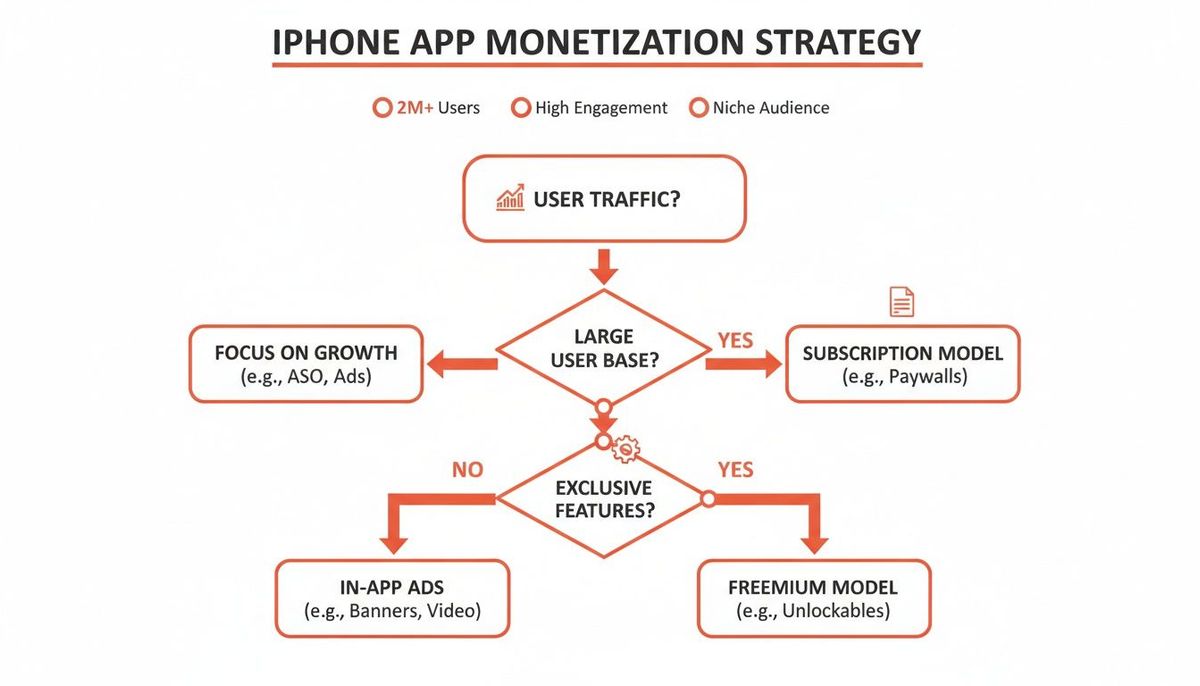
As you can see, the right path really depends on whether your app is driven by a massive user base, exclusive content, or unique features that people can't get elsewhere.
A Practical Comparison of Models
Picking your monetization model is one of the most important decisions you'll make. Each strategy has huge implications for your revenue, your user experience, and the metrics you'll obsess over every single day.
To make this choice clearer, here's a side-by-side breakdown of the main contenders.
Comparing Core iPhone App Monetization Models
| Model | Best For | Revenue Predictability | User Experience Impact | Key Metric |
|---|---|---|---|---|
| **Subscriptions** | Apps providing ongoing value (e.g., content, services, SaaS) | **High.** Creates stable, recurring revenue. | Can be high friction if the value isn't clear upfront. | Monthly Recurring Revenue (MRR) |
| **In-App Purchases (IAP)** | Apps with digital goods or one-time feature unlocks (e.g., games, utilities) | **Low.** Revenue can be spiky and hard to forecast. | Low friction, as users pay only for what they want. | Average Revenue Per Paying User (ARPPU) |
| **Advertising** | Apps with high daily traffic but low direct purchase intent (e.g., news, casual games) | **Moderate.** Depends heavily on traffic volume and ad rates. | Can be disruptive and negatively impact retention if overdone. | Average Revenue Per Daily Active User (ARPDAU) |
This table should help you see the trade-offs at a glance. There’s no single "best" model—only the one that’s best for your app.
The most successful apps don’t just bolt on a payment model; they weave it into the very fabric of the user experience. Think about how Spotify’s free tier expertly nudges you toward a premium subscription, or how Duolingo uses consumable IAPs to supplement learning without killing the core loop.
Your goal is to create a seamless exchange where users feel like they're getting immense value for their money. The rest of this guide will walk you through the technical and strategic steps to bring these models to life, measure what's working, and optimize for long-term growth.
Building Your App's Revenue Engine
Okay, you've picked your monetization model. Now it's time to build the plumbing. This is where your strategy gets real—where business plans become functional code that actually puts money in your bank account.
The technical choices you make right now will ripple through your entire startup journey. They’ll dictate how fast you can launch, how easily you can scale, and even how much of each dollar you get to keep.
This isn’t just about picking a tool from a list. It’s about being brutally honest with yourself. Are you a bootstrapped founder who needed this live yesterday? Or a well-funded startup that can afford to build a custom fortress for total control? Your answer changes everything.
The Native Route: Apple's StoreKit
Let’s get one thing straight: every single in-app purchase and subscription for digital goods on iOS must go through Apple’s native framework, StoreKit. This is non-negotiable. StoreKit is the gatekeeper, handling everything from the "Confirm Purchase" pop-up to payment processing and receipt validation.
Going direct with StoreKit gives you ultimate control, but it also saddles you with a mountain of engineering work. Your team will own every piece of the puzzle:
- Receipt Validation: This is a big one. You have to build a secure backend process to check every single purchase receipt with Apple's servers. Get this wrong, and you open the door to fraud.
- Subscription State Management: Is a user active? Canceled? In a billing grace period? You have to track this complex state machine for every single user, across all their devices. It's a notorious headache.
- Cross-Platform Sync: If a user subscribes on their iPhone, they expect it to just work on their iPad and Mac. It’s on you to build the logic that makes that happen seamlessly.
This path is for the well-funded, the well-staffed, and those who have a legitimate business reason to need absolute, granular control over the entire payment lifecycle. For everyone else, it’s a distraction.
The Streamlined Path: Third-Party Services
For most founders, building a custom payments backend is a classic case of reinventing the wheel. You’re burning precious time and engineering resources on infrastructure instead of your actual product. That's where services like **RevenueCat** come in.
Think of them as a smart middle layer between your app and StoreKit. They've already built and battle-tested all the complex backend logic, so you don't have to.
Using a service like RevenueCat changes the game. Instead of spending weeks wrestling with receipt validation and subscription states, you drop in their SDK, write a few lines of code, and their servers handle all the heavy lifting. For example, implementing a free trial with native StoreKit can take dozens of lines of server-side code to validate receipts and track expiration. With RevenueCat, it's often a single function call like purchases.purchasePackage(package).
For a solo founder or small team, using a service like RevenueCat can cut weeks or even months off your development timeline. You're trading a small percentage of revenue for a massive increase in speed and a reduction in engineering headaches. It’s often the smartest trade you can make early on.
This is the default path for any startup that values speed and focus. It lets you get your paid features out the door fast, start learning from real user data, and keep your engineers focused on building things your customers actually care about.
The Custom Backend: Stripe for Everything Else
But what if you're not just selling digital features? What if you're building a marketplace, selling physical goods, or offering real-world services?
Apple’s rules are crystal clear: StoreKit is for digital content consumed inside the app. For everything else—a t-shirt, a coaching session, a ticket to an event—you can and should use a direct payment processor like **Stripe**.
Building a custom backend integrated with Stripe is the most flexible and powerful option, but also the most complex. It's the right move when:
- Your app is an e-commerce storefront selling physical products. Example: An app for a direct-to-consumer brand selling sneakers.
- You're a marketplace connecting buyers and sellers (think Etsy or Uber). Example: A platform where users book and pay for local tour guides.
- You need to handle complex financial flows, like splitting payments between multiple people or holding funds in escrow.
This approach gives you total control over your payment stack and usually means lower transaction fees than Apple's 15-30% cut. But don't underestimate the work. It’s a serious engineering investment to build, secure, and maintain. This is the road for established companies or startups whose entire business model falls outside Apple's digital goods ecosystem.
How to Price and Package Your App for Profit
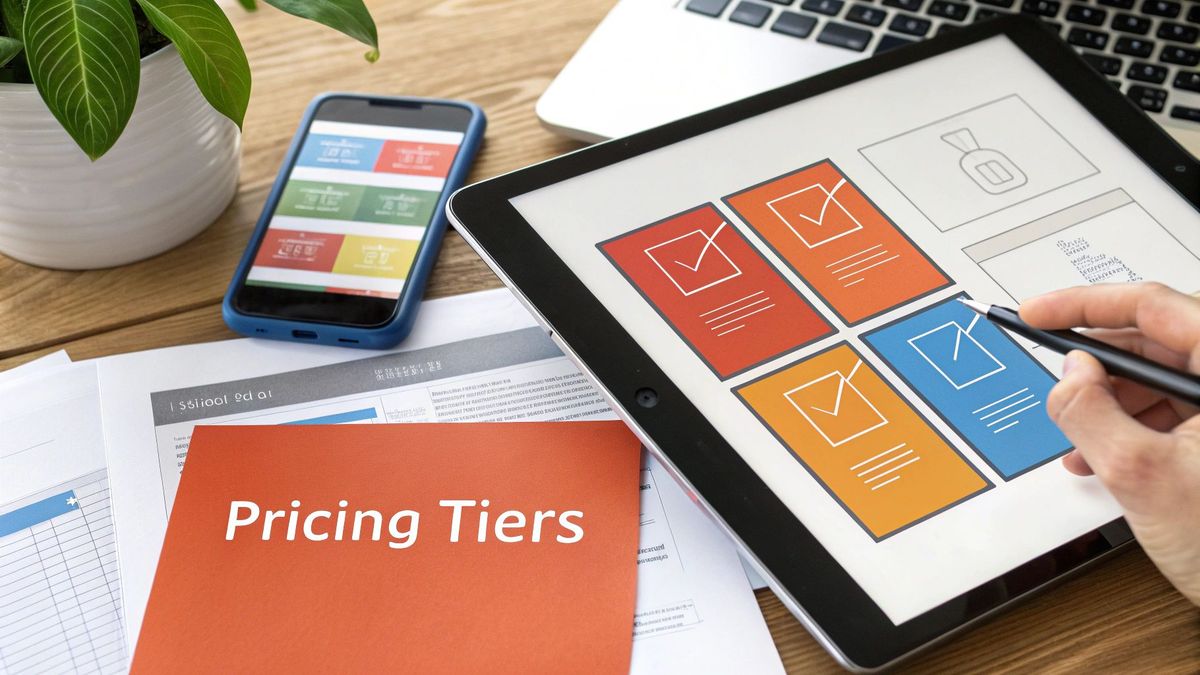
You’ve picked your monetization model and sorted out the technical plumbing. Now for the really hard part—the place where psychology and product marketing collide: figuring out what to charge and how to frame the offer.
This isn’t about just picking a number out of thin air. It's about communicating your app's value so clearly that users actually want to pay for it. A confusing pricing page or a poorly explained set of features will absolutely demolish your conversion rates, no matter how brilliant your app is.
To truly earn money with iPhone apps, you have to build a solid bridge between what your app does and why it's worth a user's hard-earned cash. This is all about moving away from what it cost you to build and embracing a value-based approach.
Aligning Price with Perceived Value
Value-based pricing is a simple concept that's surprisingly tough to nail. It just means you charge based on the value your app delivers, not your development costs. A user couldn't care less about your server bills; they only care about whether your app solves a problem or makes their life better.
Take the meditation app Calm, for example. It isn't just selling audio files. It's selling better sleep, less anxiety, and a path to mindfulness. The pricing reflects the incredible value of those outcomes. They package their content into distinct groups—sleep stories, guided meditations, music—so the premium tier feels like a comprehensive wellness library, not just a simple feature unlock.
Your paywall is one of the most important screens in your entire app. Don't treat it like an afterthought. It should be a masterclass in marketing, clearly articulating the "before and after" transformation a user will experience by upgrading.
Contrast that with a productivity tool like Todoist. Its paid tiers gate advanced features like custom filters, reminders, and project templates. A casual user can get by just fine on the free plan, but for a power user juggling complex workflows, those features are indispensable. The value is tangible and directly tied to their professional output.
Designing Tiers That Convert
Just throwing up a "Pro" version and calling it a day isn't going to cut it. Your pricing tiers need to psychologically guide users toward a decision, making the choice feel obvious for your ideal customer.
Here are a few battle-tested tactics:
- The Decoy Effect: A three-tiered model (think Basic, Plus, Premium) is incredibly effective because the middle option almost always looks like the best deal. Practical example: A photo editing app might offer a $2.99/mo plan with basic filters, a $7.99/mo plan with pro filters and video editing, and a $9.99/mo plan that adds cloud storage. Most users will pick the $7.99 option because it feels like the best value compared to the others.
- Strategic Feature Gating: This is the fine art of giving away just enough value in the free version to get users hooked, while holding back the most powerful features for paying customers. The key is to make the free version useful but ultimately incomplete for your target user. Actionable insight: Let free users experience a core feature a limited number of times (e.g., three free document scans) before prompting them to upgrade.
- Annual Discounts: Offering a steep discount for an annual subscription (e.g., "Get 12 months for the price of 10") is a proven winner. It gives your cash flow a massive boost and locks users in for the long haul, seriously increasing their LTV.
There's a reason the freemium model dominates the App Store. The data shows that out of over 1.8 million apps, a staggering 95.41% are free to download, earning their keep from in-app purchases and subscriptions. This model is king because it lets you segment users by their willingness to pay.
Leveraging Different Purchase Types
Beyond subscriptions, don’t sleep on other in-app purchases that can pad your revenue, especially depending on your app category.
- Consumables: These are one-time purchases that get used up. Think extra lives in a game, credits for a service, or "super likes" in a dating app. They're perfect for your most engaged users—the "whales"—who are happy to spend more for a better experience. Example: Headspace sells one-off "Singles" meditations for specific situations, like a pre-presentation focus session, separate from their main subscription.
- Non-Consumables: These are permanent, one-time unlocks. This could be a "remove ads forever" option, a pack of photo filters, or a digital book. They're a great alternative for users who hate subscriptions but will gladly pay once for a specific piece of value.
By combining these strategies, you can build a flexible monetization engine that caters to different kinds of users. You can see how the most successful companies do this by exploring some of the **best app monetization strategies**. This mix of subscriptions, consumables, and one-off purchases creates multiple paths for you to earn money with iPhone apps.
Once your monetization is wired up and your pricing is set, the real work begins. The journey to making money with your iPhone app now shifts from building features to building an audience. This means finding new users without burning all your cash and, most importantly, convincing them to stick around long enough to become paying customers.
It’s a constant balancing act between two numbers that will define your startup's success: Customer Acquisition Cost (CAC) and Lifetime Value (LTV).
Put simply, the total revenue a user brings in over their entire time with your app (LTV) has to be way higher than what you paid to get them (CAC). If that math is upside down, even the most brilliant app will slowly bleed out.
Winning the User Acquisition Game on iOS
The fight for attention on iOS is fierce, and you can see it in the ad spend. Global app marketing for user acquisition hit a staggering $78 billion in 2025. That’s a 13% jump from the year before, fueled almost entirely by a massive 35% surge in iOS spending while Android stayed flat.
This tells you one thing: the iPhone is where the money is, especially for non-gaming apps where iOS acquisition spend rocketed up 40%. You can dig into more of this data in the latest app marketing trends from AppsFlyer.
This spending frenzy means you can’t just spray money at ads and pray. You need a smarter, more calculated game plan.
- Nail Down Your Ideal User: Who are they, really? What problem are you solving for them that they can't solve now? Knowing this lets you target your ad spend with laser precision on platforms like Apple Search Ads or Meta. Actionable Insight: Instead of targeting a broad "fitness" audience, a high-intensity interval training (HIIT) app should target users interested in CrossFit, Peloton, and specific fitness influencers to lower CAC.
- Master App Store Optimization (ASO): Think of your App Store page as your most critical piece of real estate. Optimizing your app's name, keywords, screenshots, and description is the single most cost-effective way to get organic downloads. Our guide on App Store Optimization best practices is a complete playbook for this.
- Actually Track Your Funnel: Know your numbers cold. What percentage of people who see your ad install the app? Of those, how many finish onboarding? And how many start a free trial? Finding where users drop off is the first step to plugging the leaks in your acquisition bucket.
Retention: The Unsung Hero of App Revenue
Getting a new user is expensive. Keeping one is profitable. High churn will silently murder a subscription app, because you're constantly fighting just to replace the paying customers you’re losing. This is why retention isn't just a metric; it's the engine of sustainable growth.
The battle for retention is usually won or lost in the first few days. A killer onboarding experience is your best shot at showing off the value of your premium features and setting the stage for a long-term relationship.
Don't just show users what your app does—show them what they can become with it. An effective onboarding flow isn't a feature tour; it's a guided journey to their first "aha!" moment, where they experience the core value firsthand.
Practical Strategies to Keep Users Coming Back
Beyond a slick onboarding, you have to build habits and create real reasons for people to open your app day after day.
- Send Smart Push Notifications: Stop blasting generic alerts. Send timely, personalized notifications that actually add value. For a fitness app, that could be a reminder for a workout you scheduled or a "great job" message after hitting a new personal best.
- Build an In-App Community: Give users a reason to connect with each other. A language-learning app could have forums to find practice partners. A photo editing app could feature a gallery of user creations. This sense of belonging creates powerful network effects that competitors can't just copy.
- Get Proactive with Re-engagement: Don't just wait for people to leave. Identify at-risk users—the ones whose activity is dropping off—and hit them with a special offer or helpful content to pull them back in. This is where remarketing is key. iOS remarketing spend just hit $17 billion, a 71% increase, which proves that the best apps are obsessed with bringing users back.
By focusing as much on keeping the users you have as you do on finding new ones, you build a loyal base. That base provides predictable, recurring revenue—the holy grail for any founder trying to build a real business on the App Store.
Tracking the Metrics That Actually Drive Revenue

You've built your revenue engine and dialed in your pricing. Now comes the moment of truth: facing the numbers. If you really want to earn money with iPhone apps, you have to look past the vanity metrics.
Downloads feel good, but they don't pay your server bills. Forget total downloads. Investors and experienced founders care about the data that signals a sustainable, scalable business. This means obsessing over the numbers that connect what users do directly to your bottom line.
Core Metrics for Subscription Apps
For any app with a recurring revenue model, a handful of metrics tell you almost everything you need to know about its health. Mastering these is non-negotiable.
- Monthly Recurring Revenue (MRR): This is the predictable cash flow from all your active subscriptions each month. It's the lifeblood of a subscription business, giving you a stable baseline for forecasting and growth.
- Average Revenue Per User (ARPU): Simple division: total revenue divided by total users over a set period. ARPU tells you what a user is worth on average, which is critical for making smart decisions about your marketing spend.
- Churn Rate: This is the percentage of subscribers who cancel in a given period. High churn is a silent killer. For a mature app, a rate climbing above 5-7% annually is a huge red flag that your product isn't delivering enough value to stick.
- Trial-to-Paid Conversion Rate: The percentage of users who move from a free trial to a paid plan. A strong conversion rate—benchmarks for well-tuned apps often sit between 15-25%—proves your onboarding and paywall are hitting the mark.
Setting Up Your Analytics Funnel
Knowing what to track is only half the battle. You also need to know where users are giving up. This is where conversion funnels come in, and tools like Mixpanel or Amplitude are your best friends.
A typical monetization funnel tracks the journey from a fresh install all the way to a paid subscription.
Imagine a funnel for a fitness app:
- User installs the app.
- User completes the onboarding survey.
- User views the paywall screen.
- User starts a 7-day free trial.
- User converts to a paid subscription.
Visualizing this flow immediately pinpoints your leaks. If 90% of users finish onboarding but only 10% start a trial, your paywall's messaging or pricing is likely the problem. If 80% start a trial but only 20% convert, the trial experience itself probably isn't showcasing enough value.
A common mistake is treating all users the same. Segment your data. Analyze the behavior of users who convert versus those who churn. You'll often find that your most valuable customers engage with a specific feature within their first 24 hours. That's your "aha!" moment—the key to improving onboarding for everyone else.
Connecting Metrics to Profitability
Ultimately, all these numbers feed into the most critical equation for any startup: the relationship between Customer Lifetime Value (LTV) and Customer Acquisition Cost (CAC). We break this down in detail right here: Customer Acquisition Cost vs Lifetime Value.
A healthy business requires your LTV to be significantly higher than your CAC, ideally by a ratio of at least 3:1. For every dollar you spend getting a new user, you need to get at least three dollars back over their lifetime with your app. Simple as that.
This is where your metrics directly inform your ad budget. To make sure your marketing dollars aren't just disappearing into thin air, you have to calculate your break-even ROAS (Return On Ad Spend). This tells you the absolute minimum return you need from your campaigns just to cover your costs. Anything above that is profit.
Without this data, you're just guessing. And guessing with your marketing budget is one of the fastest ways to burn through cash without seeing any real growth.
Optimizing Your App After Launch
So, you’ve launched. Pop the champagne, but don’t kick your feet up just yet. Launch day isn't the finish line; it's the starting gun. Now the real work begins—turning that initial monetization setup into a well-oiled growth engine. This is where you start refining, tweaking, and truly understanding what makes your users tick.
First things first, let’s talk about staying on Apple’s good side. The App Store Review Guidelines are your monetization bible. Seriously, read them. A huge number of rejections come from founders trying to get clever with in-app purchases. If you're selling digital goods or features, it must go through StoreKit. Don't even think about linking out to your website to bypass their cut; it's a fast track to getting your update denied.
Navigating Apple’s Ecosystem
Apple knows startups are the lifeblood of the App Store, which is why they created the Small Business Program. This is a game-changer. If your app is making less than $1 million a year, you can apply to get Apple's commission slashed from 30% down to just 15%.
That extra 15% goes straight back into your pocket. For an early-stage company, that's more money for marketing, for hiring another engineer, or just extending your runway. You have to proactively enroll, but it’s a straightforward process. Not doing this is like leaving free money on the table—it's one of the most impactful financial optimizations you can make.
Creating a Post-Launch Optimization Loop
The most successful founders I know treat monetization like a core product feature, not a static setting. It needs constant iteration. Your goal is to create a continuous loop of testing, learning, and improving. You can dig into resources on A/B testing in marketing to see how this applies to everything from your paywall to your user acquisition funnels.
Here’s what that loop looks like in practice:
- Actually Talk to Your Users: Get on the phone, send surveys, or use in-app prompts to ask users what they think of your pricing. Is it a no-brainer? Too expensive? Is the value proposition crystal clear? Actionable Insight: Use a tool like Sprig to trigger a simple in-app survey asking non-subscribers, "What's the main reason you haven't upgraded yet?" The answers will be brutally honest and incredibly useful.
- A/B Test Your Paywall Like Crazy: Your first paywall is just your best guess. Now it's time for data. Test everything: headlines, feature bullet points, button colors, pricing tables, and trial lengths. A tiny conversion lift here can have a massive impact on your bottom line.
- Figure Out Why People Churn: When a user cancels their subscription, that’s a learning opportunity. Set up a simple exit survey. Was a key feature missing? Did they find a better alternative? This feedback is gold for prioritizing your roadmap.
- Keep Adding Value: A stagnant app is a dying app. People pay for things that get better over time. Regular updates that add real, tangible value to your premium tiers give subscribers a compelling reason to stick around month after month.
Monetization isn't a "set it and forget it" task. The most profitable apps are constantly testing, learning, and adapting. Your first version is just a hypothesis; your users' behavior provides the data to prove or disprove it.
Frequently Asked Questions
Alright, let's tackle some of the common questions and misconceptions that pop up when founders get serious about making money with their iPhone apps.
Can I Just Use Stripe to Avoid Apple's 30% Commission?
The short answer is no—not for digital goods. If you're selling features, content, or subscriptions inside your app, you absolutely must use Apple’s In-App Purchase (IAP) system.
Apple's rules on this are ironclad. Trying to route around them with an external payment processor like Stripe for digital purchases is a surefire way to get your app rejected or even kicked off the App Store. That means accepting the 15-30% commission as a cost of doing business on their platform.
So, when can you use Stripe? It's perfectly fine for selling physical things (like company merch) or real-world services (like a coaching session you book through the app). But for anything digital consumed within the app, you have to play by Apple's rules.
What's a Realistic Revenue Goal for a New App?
This is the million-dollar question, and the honest answer is that it varies wildly. Most new apps make very little at first. Success is a tough mix of finding the right niche, nailing your marketing, and, of course, having a product people actually want to use.
Instead of fixating on a raw dollar amount, your initial goal should be a positive return on investment. The real metric to watch is the ratio of your Customer Lifetime Value (LTV) to your Customer Acquisition Cost (CAC). Aim for an LTV that's at least 3x your CAC.
Once you have that healthy ratio, you can start pouring fuel on the fire. A well-built niche app with a subscription model could realistically target five or six figures in Monthly Recurring Revenue (MRR) within its first couple of years. But getting there isn't magic; it demands serious, sustained investment in both the product and user acquisition.
How Important Is a Free Trial for a Subscription App?
It’s not just important; for most subscription apps, it's critical. A free trial is probably the single most powerful tool you have for converting users on the App Store.
Think about it from the user's perspective. A trial removes all the risk. It lets them experience the full value of your app before asking them to open their wallet. Time and time again, we see that apps with free trials have dramatically higher conversion rates from download to paid subscriber.
The right trial length depends on how quickly a user can see the benefit. For a simple utility or content app, a 7-day trial is often the sweet spot. For more complex tools, especially in a B2B context where the value takes longer to become obvious, you might want to test a 14 or 30-day trial.
At Vermillion, we partner with founders to build high-growth apps on a technical foundation that’s built to last. If you need a team to help turn your monetization strategy into a reality, see how we work at https://vermillion.agency.